Generate Subtitles on Mac, 100% Offline and Private
95%+ accurate, 100% offline, no subscription, no limit (supports English, Chinese, Japanese, Korean, and 98+ languages)

Support your favorite editor
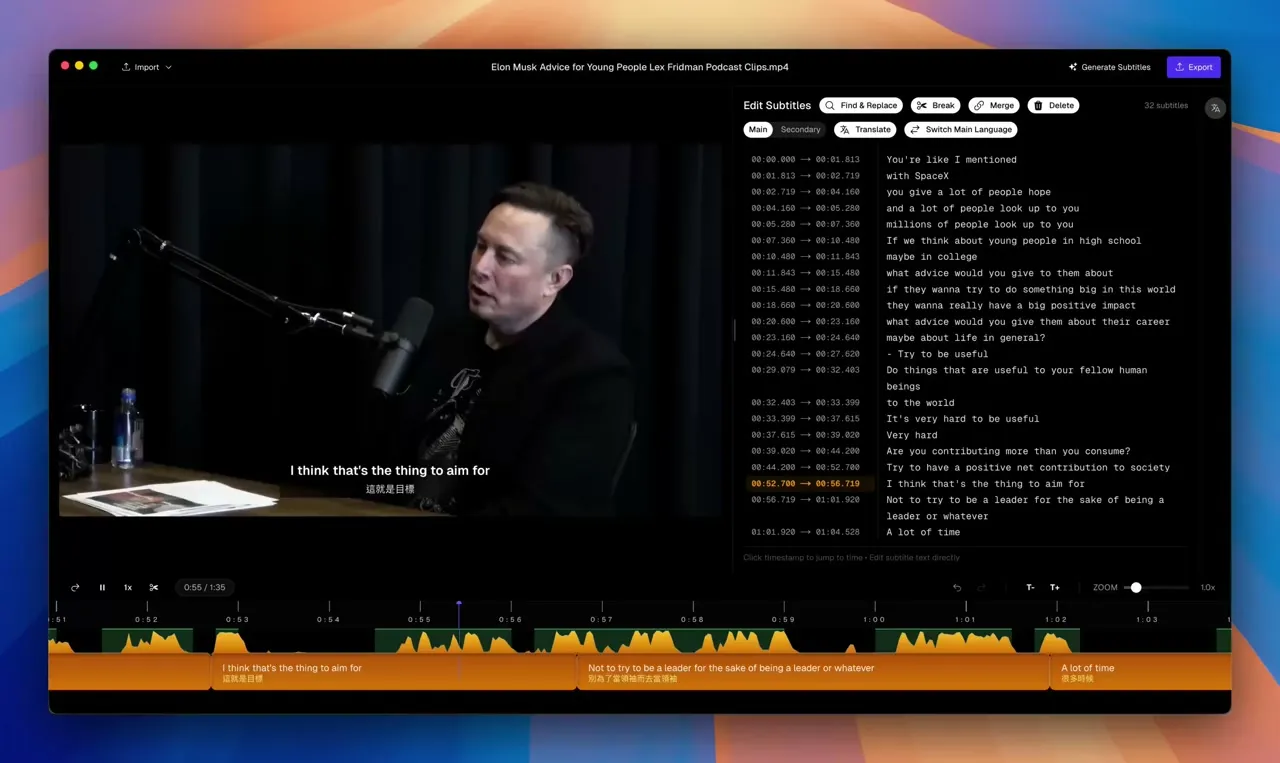
Elon Musk: Advice for Young People | Lex Fridman Podcast Clips
Drops into every editor
you already use.
Export clean SRT or native Final Cut titles — your editor, your timeline, your shortcuts. Just skip the part where you type captions by hand. Final Cut, DaVinci Resolve, and burn-in for social.
See How the App Works
Watch a step-by-step walkthrough — import a video, generate subtitles, and export with Subtitle Studio AI.
Simple, Transparent Pricing
Download for free. Upgrade when you're ready to export.
Lifetime License
Unlock full export capabilities and remove all limitations.
- Unlimited transcription & editing
- 100% offline — no uploads, no cloud
- Subtitle translation & dual subtitles
- Burn subtitles into video (MP4 output)
- Bulk video conversion
- Export to SRT — works with Premiere, FCP, DaVinci
- Lifetime software updates
- 1 device
98+ Languages
Auto-detect and transcribe English, Spanish, French, Chinese, Japanese, and 90+ more.
Apple Silicon Optimised
Built for M1/M2/M3/M4/M5 Neural Engine — processes faster than real time.
Zero Data Collected
No account required. No telemetry. Your footage never touches a server.
Questions & Answers
If you have any other questions, please get in touch.
How is Subtitle Studio different from other subtitle generation apps?
Most subtitle apps hand you the raw AI output and call it done. We go several steps further — before transcription even begins, we preprocess your audio, run voice activity detection (VAD) to isolate speech, strip background noise, and then align the transcript back to the exact audio timing. The result is noticeably cleaner, better-timed subtitles with far fewer manual corrections needed.
We also worked closely with content creators to design the workflow around how editors actually work. Drop in your video, click Generate, click Export — that's it. No configuration wizards, no format headaches, no post-processing in another app.
Does Subtitle Studio work without an internet connection?
Yes — completely. All transcription runs on your Mac using on-device AI models. Your videos never leave your machine, and the app works fully offline after the initial model download.
For translation, you can use Ollama (installed separately) to keep everything local and private, or connect a public LLM API if you prefer.
What video formats are supported?
Subtitle Studio supports all major formats including MP4, MOV, MKV, AVI, M4V, and more. If macOS can play it, Subtitle Studio can process it.
How accurate is the transcription?
Subtitle Studio uses OpenAI's Whisper model running locally on your Mac. Accuracy is typically 95%+ for clear audio in supported languages, and the Neural Engine on Apple Silicon makes it faster than real time.
Which languages are supported?
98+ languages are supported for transcription, including English, Spanish, French, Mandarin, Japanese, Korean, Arabic, German, and many more.
Translation is powered by an LLM and requires either a locally running Ollama instance or a public LLM API key (e.g. OpenAI, Anthropic). This keeps translation fully under your control — use a local model for complete privacy, or a cloud API for convenience.
What subtitle formats are supported for export?
Subtitle Studio exports to SRT, which works with Adobe Premiere Pro and DaVinci Resolve. For Final Cut Pro users, we also export as a title layer — subtitles are imported directly into your timeline as native FCP titles, so you can edit the style, font, and timing without leaving Final Cut.
Can I use it on more than one Mac?
The Lifetime License covers 1 device. If you need additional seats, please contact us at hello@subtitlestudio.ai and we can discuss multi-seat options.
Are software updates included?
Yes. Your lifetime license includes software updates for the life of the product. Your license never expires and the version you have keeps working.
Is there a free trial?
Yes. You can download Subtitle Studio for free and use the full transcription and editing features. Export capabilities (burn-in video, SRT export, translation) require a Lifetime License.