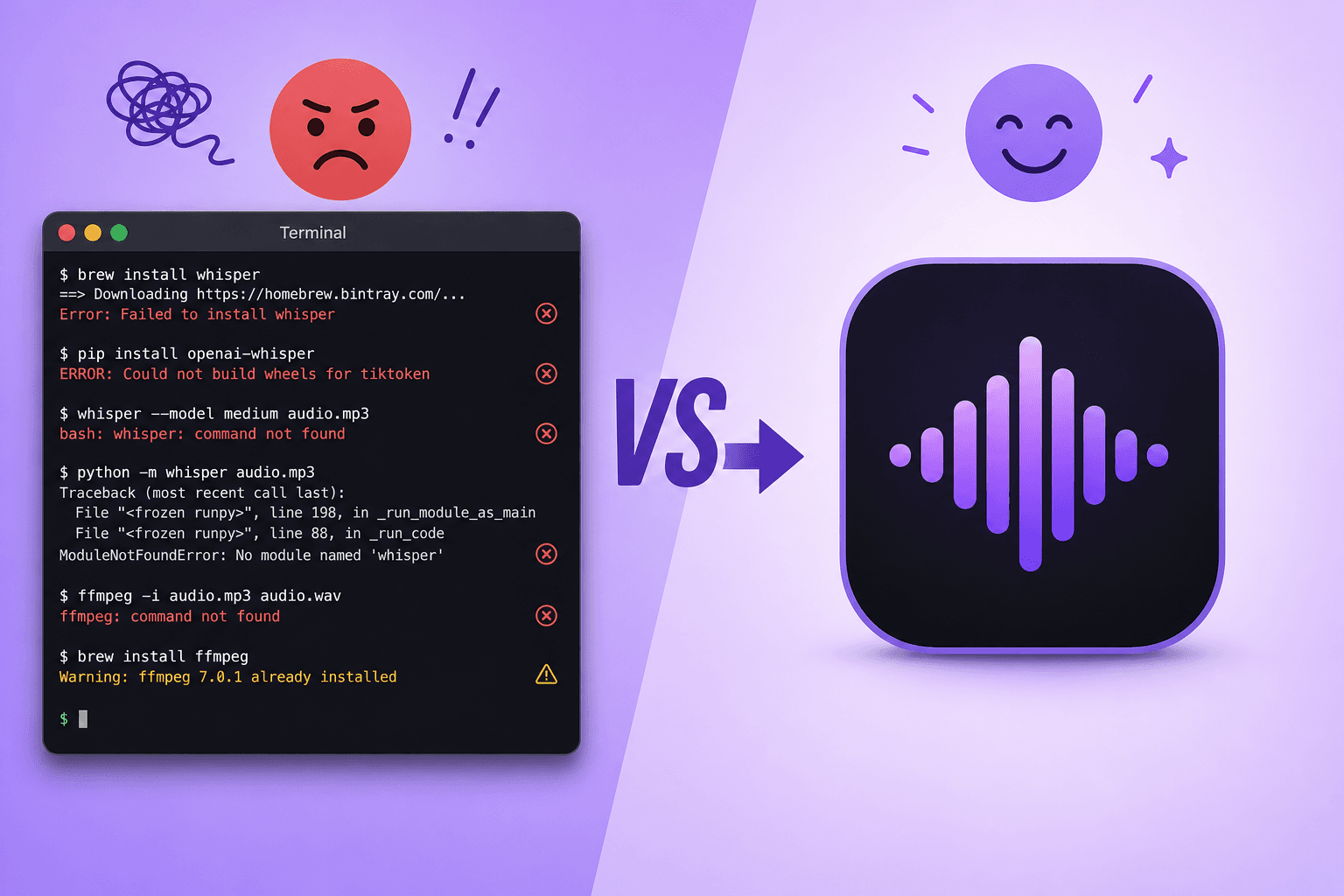
Quick answer: OpenAI's Whisper model itself is not an app — it's a Python library you install and run from the terminal, which means Homebrew, the right Python version, a virtual environment, FFmpeg, and (often) a pile of dependency errors before you get a single transcript. If you don't want to touch code, the fastest route to the same on-device, private transcription is a Mac app that already has Whisper built in — like Subtitle Studio — which skips the setup entirely and adds the preprocessing and editing tools raw Whisper doesn't have.
If you've searched "how to run Whisper on Mac" and landed on a guide with six steps before step one even mentions your actual audio file, you're not imagining things. Here's why that happens, where people get stuck, and the no-code alternative.
What Is OpenAI Whisper (And Why It's Not an App)
Whisper is OpenAI's open-source speech recognition model, released in 2022 and updated since (large-v3, turbo). It's genuinely excellent — accurate across 90+ languages, free to use, and it runs entirely on your own machine with no audio uploaded anywhere. That's exactly why so many people want to run it themselves.
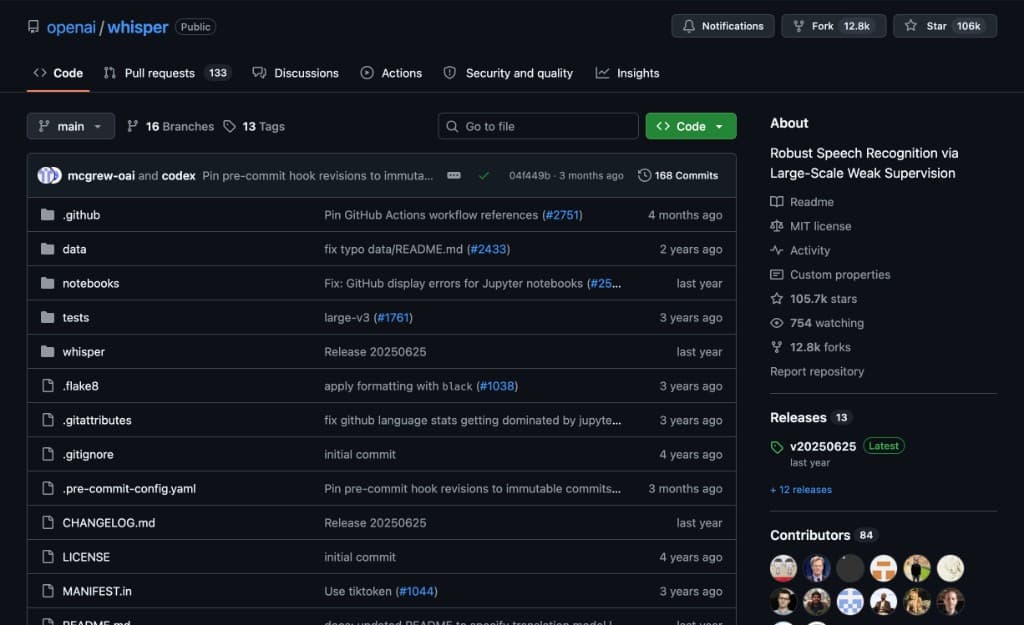 The openai/whisper GitHub repository — 106k stars, but a source code repo with no download button, no installer, and no app to open
Notice what's missing from that page: a download button, an installer, an app icon. What you get is a folder of Python source code — 106,000 people have starred the repository, but starring it doesn't install anything on your Mac.
But the GitHub repository is a research codebase, not a consumer product. The official setup instructions assume you're comfortable with:
- Installing and managing Python versions
- Using
pipand virtual environments - Reading a Python traceback when something breaks
- Installing a system dependency (FFmpeg) separately from the model itself
None of that is unreasonable for a machine learning researcher. It's a lot to ask of someone who just wants captions for a YouTube video by tonight.
The "Official" Way to Run Whisper on Mac, Step by Step
To be fair to the Whisper team, the README is well-written. Here's what it actually takes to go from "nothing installed" to "a transcript on screen."
Step 1: Install Homebrew
If you don't already have Apple's unofficial package manager, that's the first install:
/bin/bash -c "$(curl -fsSL https://raw.githubusercontent.com/Homebrew/install/HEAD/install.sh)"
Step 2: Install a compatible Python version
Whisper's dependency chain (numba, tiktoken, PyTorch) does not support the newest Python releases. As of this writing, Python 3.13 breaks the install — you need 3.10, 3.11, or 3.12:
brew install python@3.11
Step 3: Create a virtual environment
To avoid Whisper's dependencies colliding with anything else on your system, the recommended approach is an isolated environment:
python3.11 -m venv whisper-env
source whisper-env/bin/activate
Step 4: Install FFmpeg
Whisper doesn't decode audio itself — it shells out to FFmpeg, which is a separate install:
brew install ffmpeg
Step 5: Install Whisper
pip install -U openai-whisper
Step 6: Run your first transcription
whisper your-audio.mp3 --model turbo
Six steps, three separate installers, one Python version constraint you had to already know about — before you've transcribed a single word. And that's the version where nothing goes wrong.
The Homebrew shortcut: brew install openai-whisper or brew install whisper-cpp
If you already have Homebrew, there are two one-line installs that skip the virtual environment:
brew install openai-whisper   # the original Python package, with its dependencies managed by Homebrew
brew install whisper-cpp      # the C++ port, much faster on Apple Silicon
Both save you the Python wrangling, but neither is quite "done" afterwards. openai-whisper still runs through PyTorch, so it's slow on a Mac. whisper-cpp doesn't come with any models — you download a ggml model file yourself and pass its path on every run — and its command is whisper-cli, not whisper.
Fixing "whisper: command not found"
This is one of the most-searched Whisper errors on Mac, and it almost always comes down to one of three things:
- Your virtual environment isn't active. If you installed with
pipinside a venv, thewhispercommand only exists while that venv is activated. Runsource whisper-env/bin/activateagain in every new Terminal window. - pip put it somewhere that isn't on your
PATH. Apip install --userlands the command in~/Library/Python/3.x/bin, which macOS doesn't search by default. Add that folder to yourPATHin~/.zshrc, or reinstall inside a venv. - You installed whisper.cpp, not openai-whisper. The whisper.cpp command is
whisper-cli. Typingwhisperwon't find it.
Where Everyone Gets Stuck (Real Issues from GitHub and StackOverflow)
Search "openai-whisper" install problems and the same handful of failures show up over and over. These are quoted directly from real reports, not paraphrased.
"Whisper cannot be used on Python 3.13"
If you install the latest Python from python.org instead of pinning an older version with Homebrew, the install fails immediately:
Getting requirements to build wheel ... error
KeyError: '__version__'
As one answer on the thread puts it plainly: "Whisper cannot be used on Python 3.13 using only released, supported versions of its dependency chain." (Source: StackOverflow) The fix is to downgrade your Python version and rebuild your virtual environment from scratch — not obvious if you don't already know Whisper is version-sensitive.
"ffmpeg not found" — even after installing ffmpeg
This is one of the most common Whisper errors on Mac, and it's confusing precisely because the fix looks like it should have already worked:
FileNotFoundError: [Errno 2] No such file or directory: 'ffmpeg': 'ffmpeg'
The user in this case had already run brew install ffmpeg successfully, reinstalled it, and even tried a Python FFmpeg wrapper — the actual issue was that FFmpeg's binary wasn't on the PATH Python could see. (Source: StackOverflow) Diagnosing a PATH problem requires knowing what a PATH is.
There's no CUDA on a Mac — and most tutorials assume there is
Almost every Whisper performance guide talks about CUDA, NVIDIA's GPU framework. Macs don't have NVIDIA GPUs. Apple Silicon uses MPS (Metal Performance Shaders) instead, and MPS support in PyTorch has real, documented gaps:
NotImplementedError: The operator 'aten::isin.Tensor_Tensor_out' is not
currently implemented for the MPS device. ... you can set the environment
variable `PYTORCH_ENABLE_MPS_FALLBACK=1` to use the CPU as a fallback for
this op.
That's a real error from a Whisper-adjacent PyTorch model on Apple Silicon. (Source: GitHub — huggingface/transformers #31408) The suggested workaround falls back to CPU for that operation — meaning slower processing to fix a bug that only exists because you're on a Mac in the first place.
Rust compiler errors during install
Whisper depends on OpenAI's tiktoken tokenizer. If your platform doesn't have a prebuilt wheel available, pip tries to compile it from source, which requires a Rust toolchain you probably don't have installed. The official README addresses this directly: if the install fails with No module named 'setuptools_rust', you need to separately install setuptools-rust, and possibly the full Rust development environment. That's a compiler toolchain install, to run a speech-to-text model.
The "faster" options require compiling from source
Plain Whisper on PyTorch is noticeably slow on a Mac, so the common advice is to switch to whisper.cpp or mlx-whisper for real Apple Silicon speed. Both are faster — and both trade the Python setup for a different kind of setup:
git clone https://github.com/ggerganov/whisper.cpp
cd whisper.cpp
make
./models/download-ggml-model.sh large-v3
./main -m models/ggml-large-v3.bin -f your-audio.wav
That's git, a C++ compiler toolchain, and manually downloading model files — not exactly "no coding." And even after compiling it correctly, things can still go sideways in ways that are genuinely hard to debug. One long-time user described running a batch of files through a self-compiled whisper.cpp binary on an M4 Mac mini: it "works perfectly well" on an M1, but on the M4 it "just stops" producing output after a few hours with no error, no crash — and the fix was writing a script to kill and restart the process every hour. ("Whisper continues running, there are no errors in the terminal, no crashes... there's just no more output.") (Source: Ars Technica OpenForum)
That's not a beginner mistake — that's an experienced user who still hit a wall a script and a cron job were needed to work around.
"The installation process is extremely unfriendly"
This complaint, filed as a GitHub issue against a Whisper-based tool, sums up the whole experience for non-developers: "The installer is extremely unfriendly, constantly interrupting the download of large files, resulting in incomplete installation and a missing executable file... For those without programming skills, uninstallation is the only option." (Source: GitHub — meizhong986/WhisperJAV #85) The thread's own resolution was, again, a Python version mismatch — a stranger walking through terminal commands with the reporter until it worked.
Even when it works, large models can run out of memory
The large-v3 model needs roughly 10 GB of VRAM/unified memory to run comfortably. On a base 8 GB or 16 GB MacBook, that's tight enough to cause the process to crash outright, forcing a drop to a smaller, less accurate model as the workaround.
Even If You Get It Running, Whisper Alone Isn't Subtitles
Say you push through all of the above and get a working whisper your-video.mp4 --model large-v3 command. What you get back is a transcript, not subtitles — and for video, that's a different job:
- No preprocessing. Whisper receives your raw audio as-is. If there's background music, room echo, or a noisy intro, the model has no idea to ignore it — and it's well documented to hallucinate text (repeating phrases, inventing dialogue) during silence and music beds rather than admit uncertainty.
- Approximate timing. Whisper's built-in timestamps are rounded to roughly the nearest second — fine for a transcript, not for a caption that needs to appear exactly when someone speaks.
- No line-break logic. Long run-on blocks or awkward mid-sentence splits are common in raw output, and there's no tool to fix them beyond opening the
.srtin a text editor. - No translation. If you need a second-language track, that's an entirely separate tool and workflow.
- No editing interface. Everything happens at the command line. There's no waveform, no drag-to-adjust, no undo button.
In other words, solving the install problem doesn't solve the subtitle problem. You still end up needing a second tool to turn a rough transcript into something you'd actually publish.
The Easiest Way: Skip Python Entirely with Subtitle Studio
Subtitle Studio runs the same class of Whisper model, but as a native desktop app for Mac — and now Windows too: download it, drag in your video, and get subtitles back. No terminal, no Python version to manage, no pip install to debug. (Comparing the Whisper model options first? See Whisper subtitles on Mac without opening Terminal.)
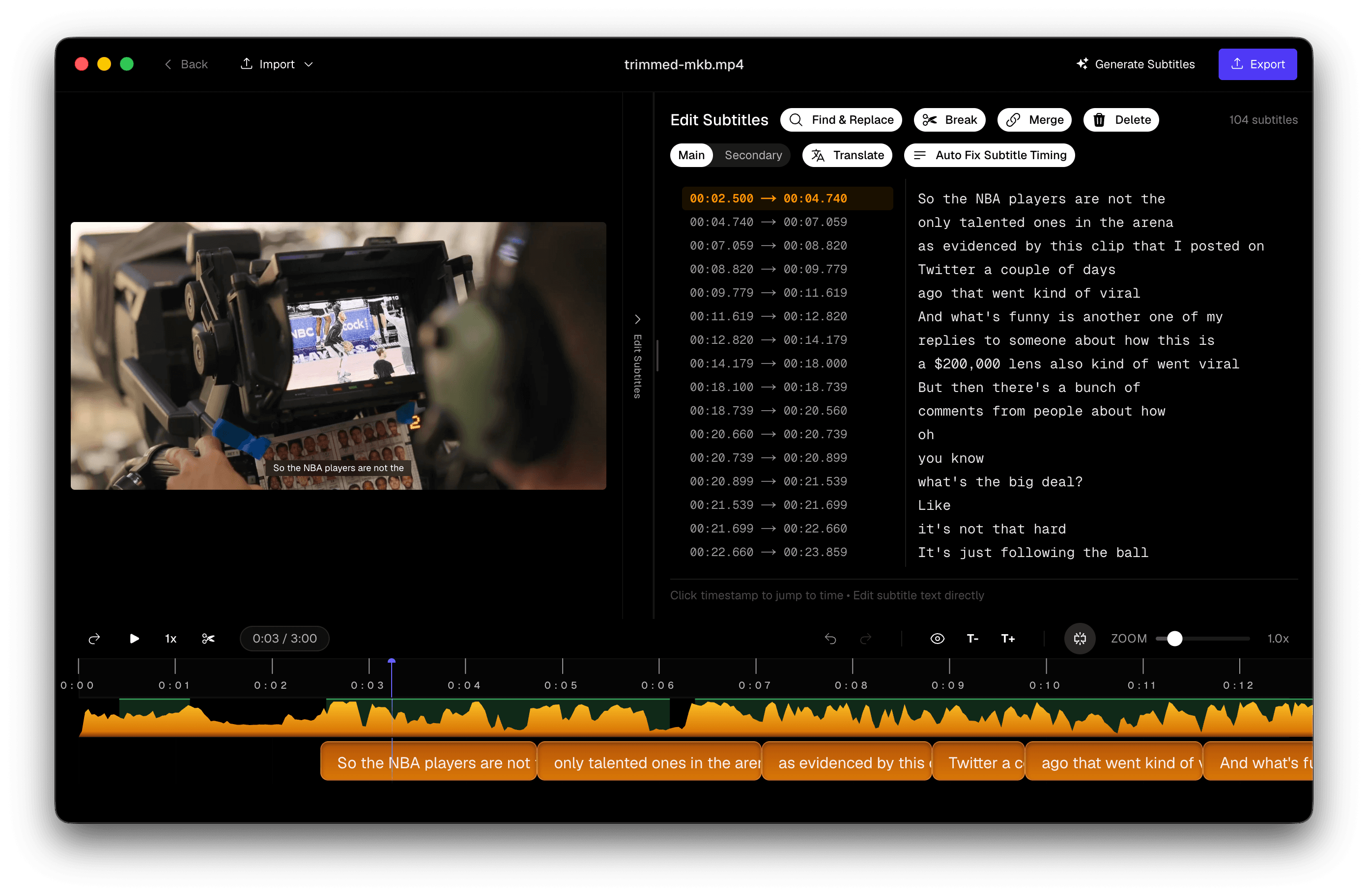 Subtitle Studio editor with waveform, subtitle list, and video preview aligned to speech
What you get on top of the terminal-free install:
- Apple Silicon-tuned model. The transcription model is optimized specifically for M-series chips with Metal acceleration — not a generic PyTorch build falling back to CPU for unsupported MPS operations.
- Preprocessing before transcription. Voice activity detection (VAD) and noise reduction clean up the audio before Whisper sees it, so background music and room noise cause fewer dropped words and less hallucinated text — the exact failure mode raw Whisper is known for.
- Hallucination filtering. Confidence scoring and speech-activity analysis catch and remove phantom text the model invents during silence or music, instead of shipping it straight to your subtitle file.
- Forced alignment. After transcription, a forced aligner maps the text back to the waveform at word level, replacing Whisper's ~1-second-rounded timestamps with frame-accurate timing.
- NLP-based segmentation. The raw transcript is split into properly readable caption lines at natural phrase boundaries, instead of arbitrary character counts.
- Built-in editing. Drag to realign a caption's timing, split an overlong line, or merge fragmented ones — no exporting to a text editor.
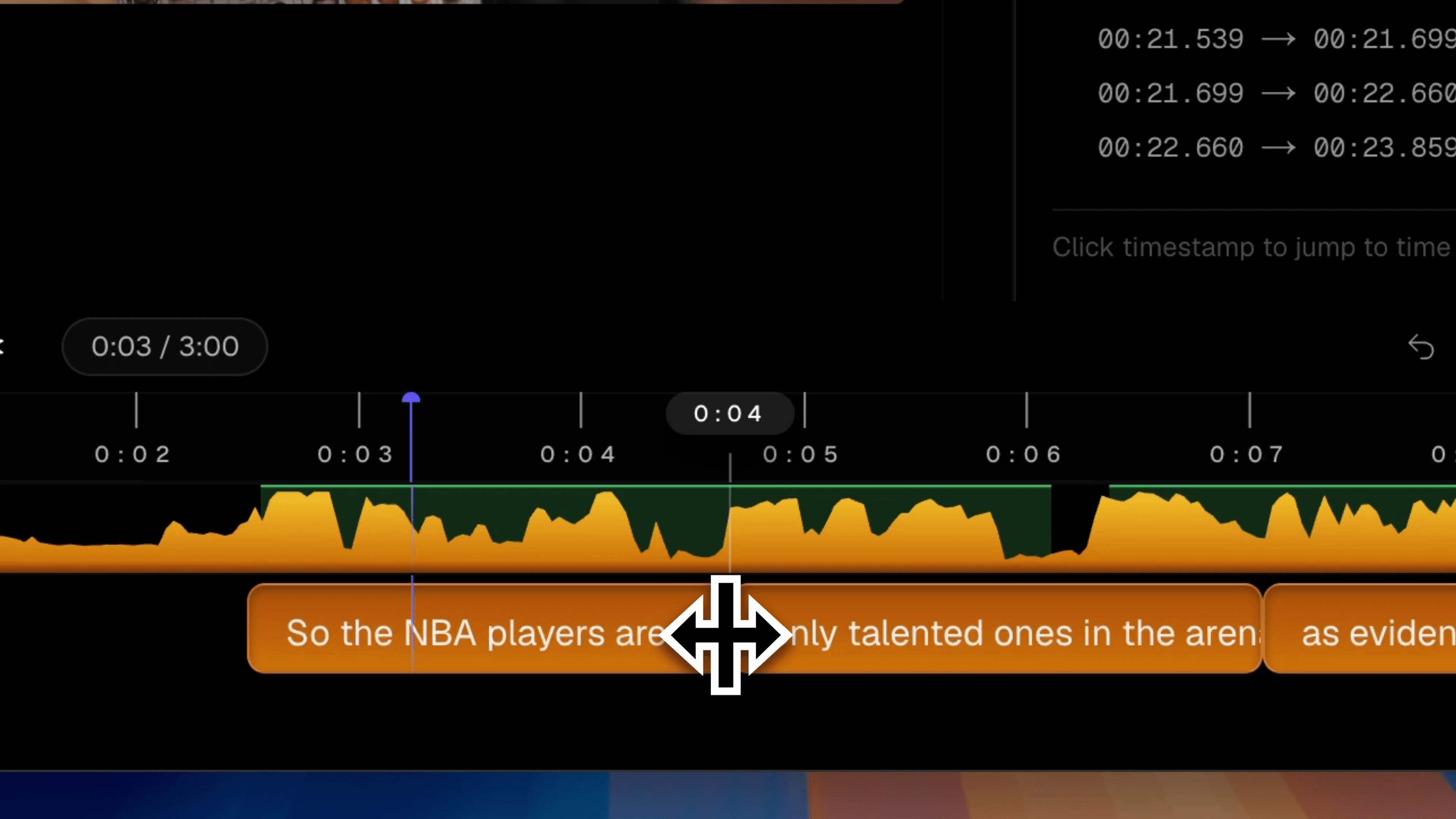 Subtitle Studio realign tool with a subtitle block being dragged to match the audio waveform
- On-device translation. Translate your finished subtitles into 25 languages, fully offline, with no API key and no per-word cost — see our deep dive on offline translation for how the local model works.
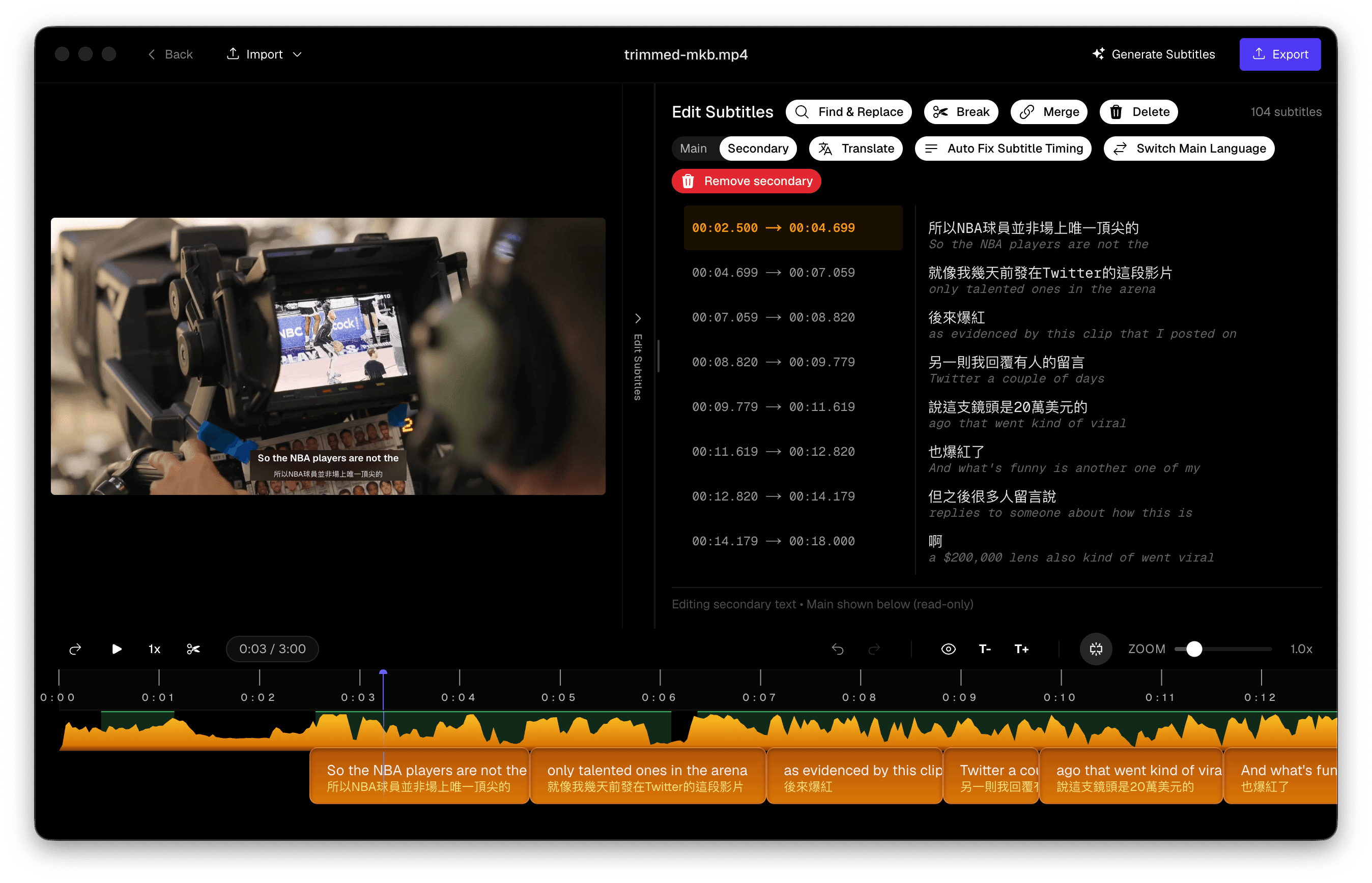 Subtitle Studio translate panel with language selector and AI provider options
Your audio and video never leave your Mac — the same privacy guarantee as running Whisper yourself, minus the setup.
Subtitle Studio
One-time purchase. Runs fully offline on Mac and Windows.
Whisper CLI vs Subtitle Studio — Side by Side
| OpenAI Whisper (CLI) | Subtitle Studio | |
|---|---|---|
| Setup | Homebrew, Python version management, virtual environment, FFmpeg, pip install | Download the app, open it |
| Coding required | Yes — terminal commands, occasional dependency debugging | No |
| Apple Silicon acceleration | Depends on PyTorch MPS support (gaps exist) | Built-in, Metal-optimized model |
| Audio preprocessing | None — raw audio sent to the model | VAD + noise reduction before transcription |
| Hallucination handling | None — raw model output | Detected and filtered automatically |
| Timestamp accuracy | ~1-second granularity | Word-level forced alignment |
| Subtitle line breaking | None — manual cleanup required | Automatic NLP-based segmentation |
| Editing tools | Text editor on the exported file | Waveform-based realign, split, merge |
| Translation | Not included | Built-in, offline, 25 languages |
| Output format | .txt, .srt, .vtt | .srt, .fcpxml |
| Platforms | macOS, Windows, Linux | macOS, Windows |
| Cost | Free (your time) | One-time purchase |
Verdict
If you're a developer who wants to script Whisper into a pipeline, batch-process thousands of files, or fine-tune the model yourself, the official CLI is the right tool — that flexibility is exactly what it's built for, and the setup cost is a one-time thing you only pay once.
If you just want accurate, ready-to-publish subtitles for a video without opening a terminal, the no-code path gets you there faster: same underlying technology, none of the environment management, and a set of subtitle-specific tools raw Whisper was never designed to include.
Subtitle Studio
No Python, no Homebrew, no terminal. Just drag in your video.
Frequently Asked Questions
Do I need to know Python to run Whisper on a Mac?
To use the official openai-whisper package, yes — you'll need to install Python, manage a virtual environment, and run commands from the terminal. If you'd rather not touch code, apps like Subtitle Studio run the same class of model with a drag-and-drop interface and no coding required.
Why does Whisper installation fail on my Mac?
The most common causes are: using an unsupported Python version (3.13 currently breaks the install; use 3.10–3.12), FFmpeg not being on your system PATH even after installing it, and missing a Rust compiler needed to build the tiktoken dependency from source. Each of these produces a different, fairly cryptic error message.
Why do I get "whisper: command not found" on Mac?
Usually because the virtual environment you installed Whisper into isn't activated, because pip install --user placed the command in a folder that isn't on your PATH, or because you installed whisper.cpp — whose command is whisper-cli, not whisper.
Does Whisper use my Mac's GPU?
It can, through Apple's MPS (Metal Performance Shaders) backend in PyTorch, but MPS support for Whisper's operations has documented gaps — some operators aren't implemented and silently fall back to slower CPU execution. whisper.cpp and mlx-whisper generally use Apple Silicon more efficiently than the original Python package, but both require compiling from source.
What's the difference between openai-whisper, whisper.cpp, and mlx-whisper?
openai-whisper is the original Python package from OpenAI — easiest to install via pip, but slower on Apple Silicon since it runs through PyTorch's MPS backend. whisper.cpp is a C++ reimplementation that uses Metal directly and is significantly faster, but you have to clone the repository and compile it yourself. mlx-whisper uses Apple's own MLX framework and is often the fastest option on M-series chips, with a similar from-source setup. None of the three include audio preprocessing, subtitle editing, or translation — they're transcription engines, not subtitle tools.
Is there a free way to run Whisper on Mac without coding?
The Whisper model itself is free and open-source, but running it without any setup requires a packaged app rather than the raw Python library — someone has to handle the installation, model management, and interface for you. Subtitle Studio is a desktop app for Mac and Windows built specifically for this: no terminal, no dependencies to manage, one-time purchase instead of a subscription.
Does Subtitle Studio use the same Whisper model as the command line?
Subtitle Studio uses an optimized, fine-tuned Whisper model built for the kind of mixed audio video creators actually work with — dialogue over music, room noise, and multilingual speech — paired with Apple Silicon acceleration. It's wrapped in a full pipeline (preprocessing, hallucination filtering, forced alignment, NLP segmentation) rather than the standalone model you'd get from pip install openai-whisper. See our MacWhisper vs Subtitle Studio comparison for a closer look at how that pipeline affects real output.
Try Subtitle Studio for free
One-time purchase. No subscription. Runs fully offline on Mac and Windows.
