If you edit video on a Mac, you've probably heard of MacWhisper — a popular app that runs OpenAI's Whisper model entirely on your device. Subtitle Studio does the same thing at the engine level: both apps use Whisper, both can transcribe speech, and both keep your audio private by processing locally.
So why would you choose one over the other?
Because transcription and subtitles are related but not the same task. MacWhisper is built to turn audio into text. Subtitle Studio is built to turn video and podcast episodes into publish-ready caption files — preprocessing audio for Whisper, post-processing the transcript with NLP for readable segmentation, and giving you editing tools that match how creators actually work.
We tested both apps on the same clips. Here's what we found.
What MacWhisper and Subtitle Studio Have in Common
Both tools share a solid foundation:
- Whisper under the hood — OpenAI's open-weight speech recognition model, running locally on Apple Silicon or Intel Macs
- On-device privacy — your video and audio never leave your machine
- Multilingual support — Whisper handles 90+ languages out of the box
- Export options — MacWhisper Pro can export SRT and VTT subtitle files; Subtitle Studio exports SRT and FCPXML
For a Zoom recording or a meeting you need in plain text form, MacWhisper is a capable choice. Drop in an audio file, pick a model size, and get a transcript with timestamps.
For podcasts, the choice depends on your deliverable. MacWhisper is great when you need a text transcript for show notes or search. Subtitle Studio is the better fit when you're publishing the full episode on YouTube, cutting audiogram clips for social, or need accurate, editable SRT captions for any video version of your show.
The gap opens when your goal is subtitles — for video, podcast video, or clips — especially content with background music, fast speech, multiple languages, or Chinese dialogue.
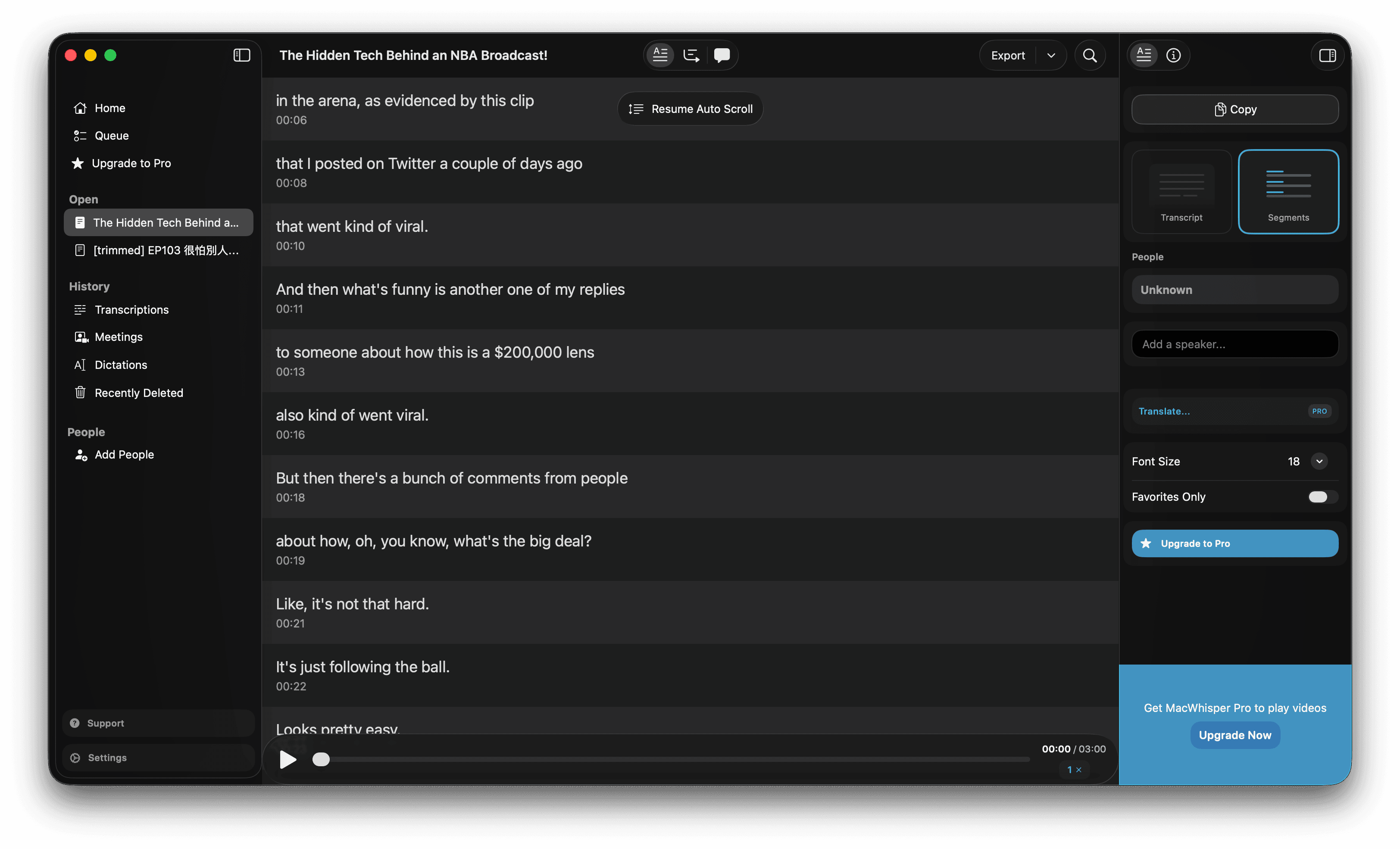 MacWhisper interface showing a transcript view after processing a video file
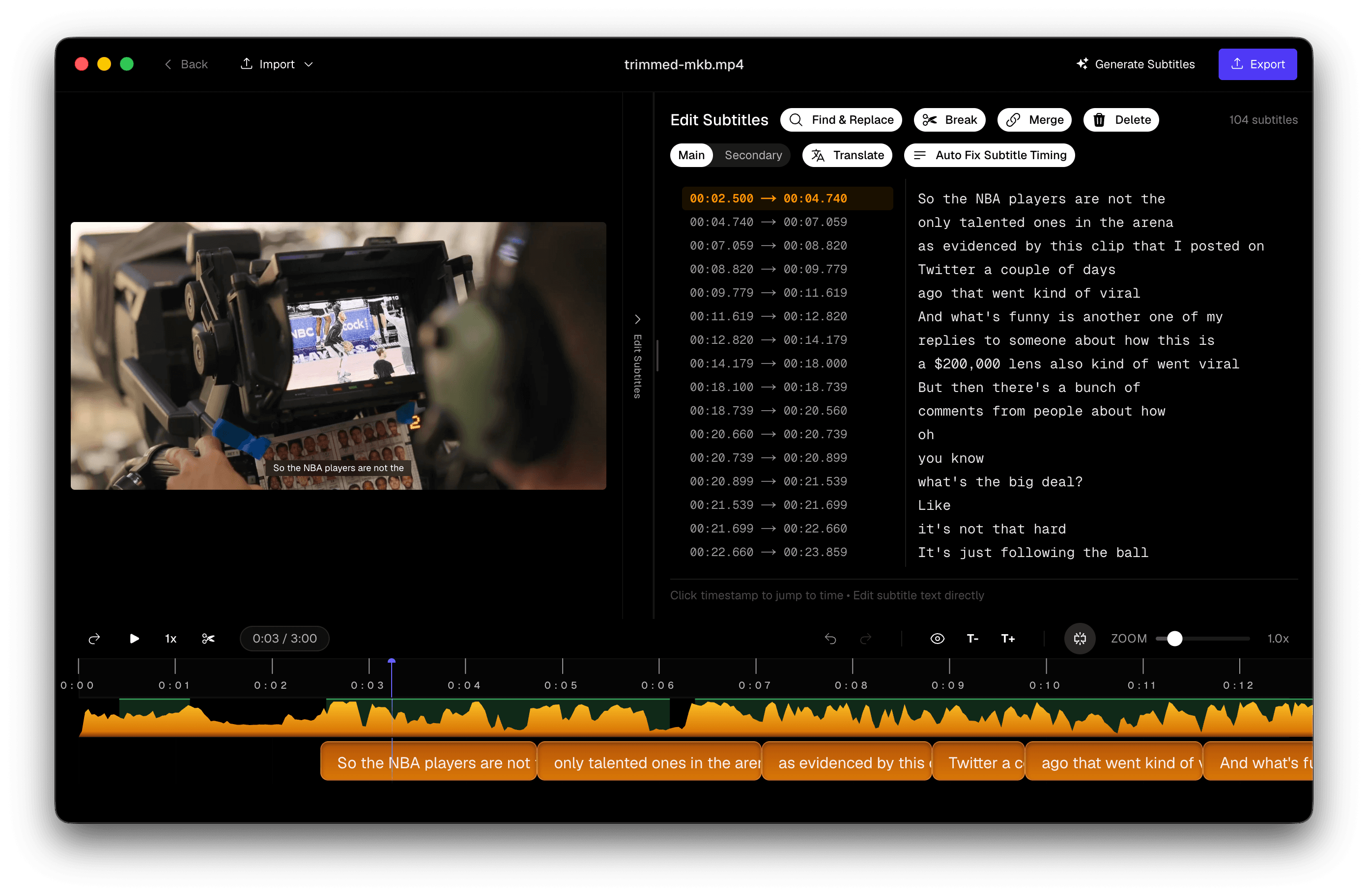 Subtitle Studio editor with waveform, subtitle list, and video preview aligned to speech
Where MacWhisper Falls Short for Video Subtitles
MacWhisper was designed as a transcription assistant, not a subtitle editor. That shows up in three places that matter most to video creators.
Background Music and Missing Words
Whisper — and by extension MacWhisper — struggles when speech competes with background music, intro jingles, or ambient sound. The model is trained to produce text for every audio segment, even when confidence is low. In practice, that often means:
- Dropped words when music masks consonants or lowers speech volume
- Merged phrases where two sentences blur into one block
- Gaps in dialogue that never appear in the transcript at all
This is a known Whisper limitation, not unique to MacWhisper. MacWhisper sends your audio straight to Whisper as-is. There is no preprocessing step to clean up the signal or optimise it for speech recognition.
No Real Subtitle Editing Workflow
MacWhisper lets you read a transcript alongside playback and export to SRT. What it doesn't give you is a subtitle-first editor:
- No waveform-synced timing handles to nudge a caption to the exact syllable
- No split or merge tools to fix awkward line breaks
- No drag-to-realign workflow when a block's start time is off by half a second
- No built-in translation tied to your timecodes
If a caption is two seconds early or a line is too long for vertical video, your options in MacWhisper are to edit the exported SRT in a text editor or open another app. For a five-minute clip that's manageable. For a 40-minute interview or a batch of social cuts, it becomes the bottleneck.
Hallucinations Are More Likely
Whisper hallucination — the model generating plausible-sounding text when there is silence, music, or noise — is one of the most documented issues with the model. Symptoms include:
- Repeating the same phrase dozens of times during a music bed
- Inserting "Thanks for watching!" or similar filler during quiet sections
- Inventing dialogue that was never spoken
MacWhisper outputs whatever Whisper produces. Subtitle Studio includes a hallucination fix optimisation that detects and removes these phantom segments using confidence scoring and speech-activity analysis — so your subtitle track reflects what was actually said, not what the model guessed during a jingle.
What Subtitle Studio Adds on Top of Whisper
Subtitle Studio doesn't replace Whisper — it wraps it in a three-stage pipeline built specifically for captioning video and podcast content: preprocess → transcribe → post-process.
Pre-Processing: Optimised Audio Before Whisper Runs
Before Whisper sees your file, Subtitle Studio prepares the audio so the model gets the cleanest possible input:
- Voice activity detection (VAD) — identifies which parts of the track contain speech and which are silence, music, or ambient noise
- Noise reduction — suppresses background hum, room echo, and competing sound so consonants and word boundaries stay clear
- Speech isolation — focuses Whisper on the dialogue that matters, rather than the full mixed audio bed
This is the same class of preprocessing recommended in production Whisper setups — but built in, automatic, and tuned for video and podcast audio rather than something you configure yourself. Cleaner input means fewer dropped words during intro music, less garbled output in noisy clips, and a lower chance of the model inventing text during non-speech sections.
Post-Processing: NLP Segmentation for Readability
Raw Whisper output is a transcript, not subtitles. Long run-on blocks, awkward mid-phrase breaks, and missing punctuation are fine for a text document — but hard to read on screen.
After transcription, Subtitle Studio runs the transcript through NLP-based post-processing to turn it into properly segmented captions:
- Natural phrase boundaries — lines break at clauses and sentence edges, not arbitrary character counts
- Readability rules — block length and reading speed are tuned so viewers can follow without rushing
- Punctuation restoration — commas, periods, and question marks are restored where Whisper left them out
- Language-aware splitting — CJK languages like Chinese and Japanese get segmentation that respects how those scripts read on screen, not how English line breaks work
The goal is subtitles you can ship with minimal manual cleanup — not a wall of text you still need to reformat by hand.
Forced Alignment for Frame-Accurate Timing
Whisper's built-in timestamps are approximate. They're often rounded to the nearest second, which is fine for a transcript but not for subtitles that need to appear exactly when a word is spoken.
Subtitle Studio runs a forced aligner after transcription: the text is mapped back to the audio waveform at word level, so each subtitle block starts and ends where speech actually begins and stops. The result is captions that feel synced to the video — not floating a beat early or lingering after the speaker stops.
Built-In Editing Tools
Everything you need to polish captions stays in one window:
Realign — grab a subtitle's edge and drag it against the waveform. Timing updates in real time without typing timecodes.
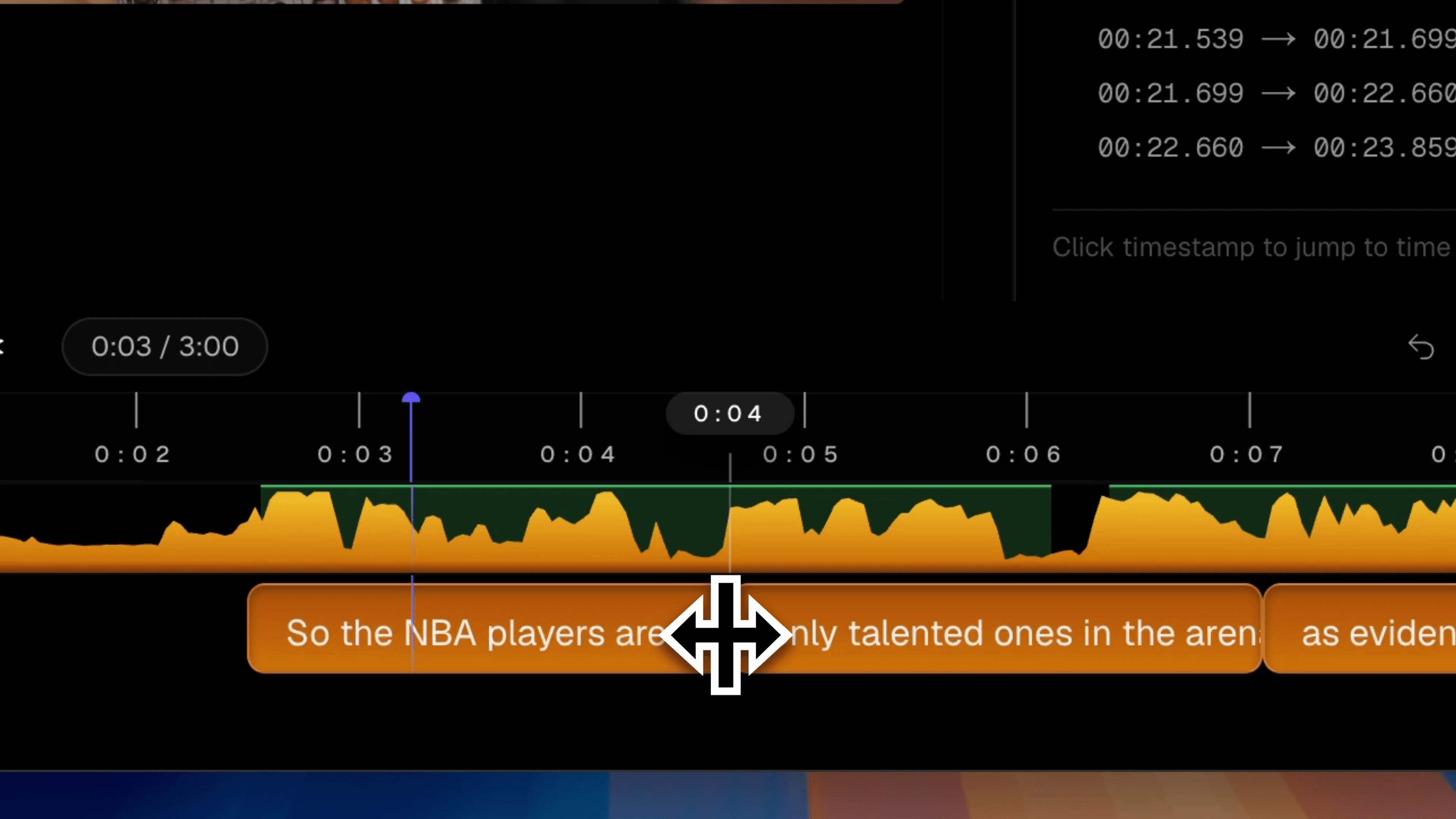 Subtitle Studio realign tool with a subtitle block being dragged to match the audio waveform
Split — break an overlong caption into two readable lines at the playhead. Timing redistributes automatically.
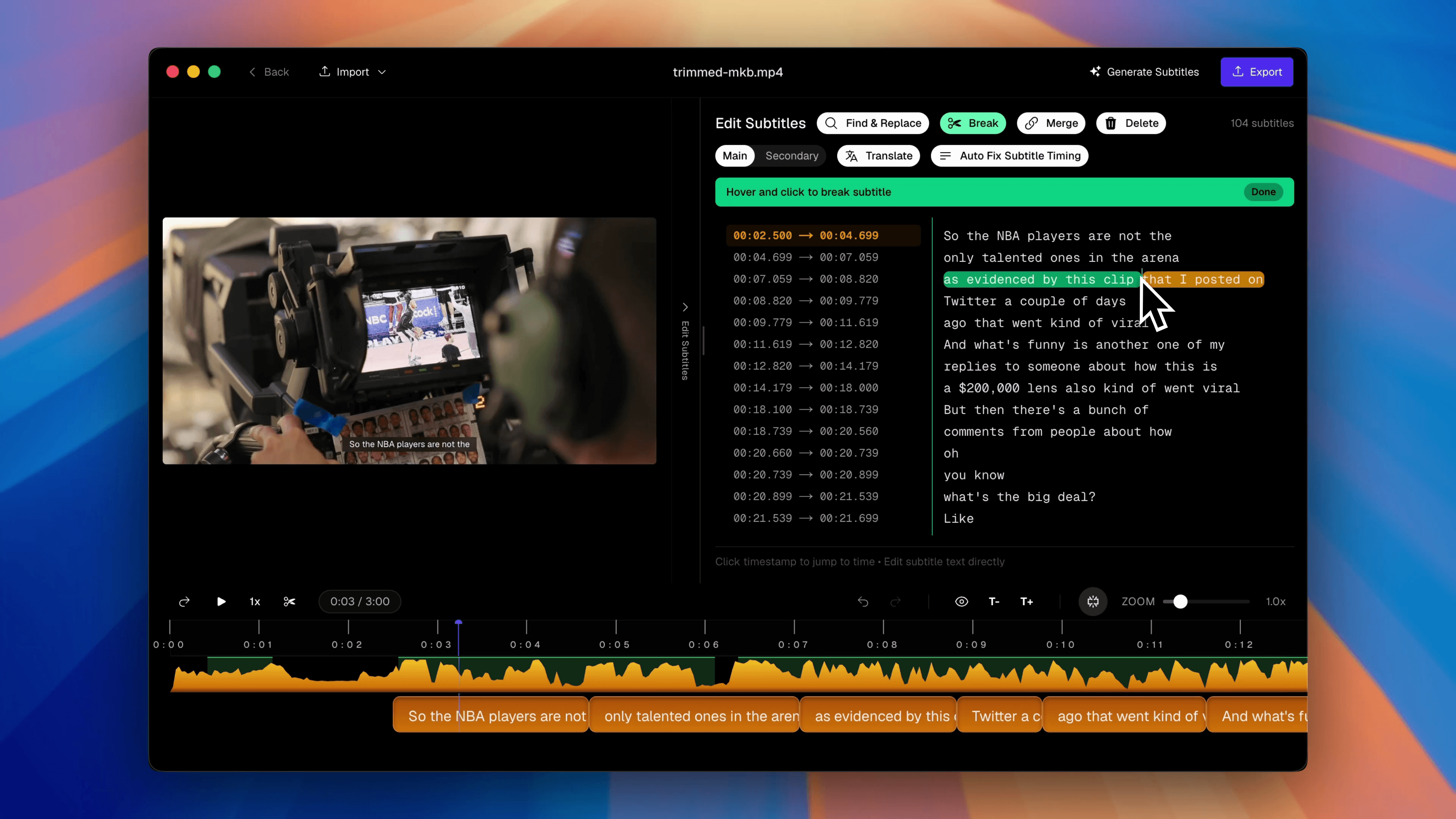 Subtitle Studio split tool dividing a long subtitle line into two shorter blocks
Merge — combine fragmented Whisper output into smooth, continuous lines.
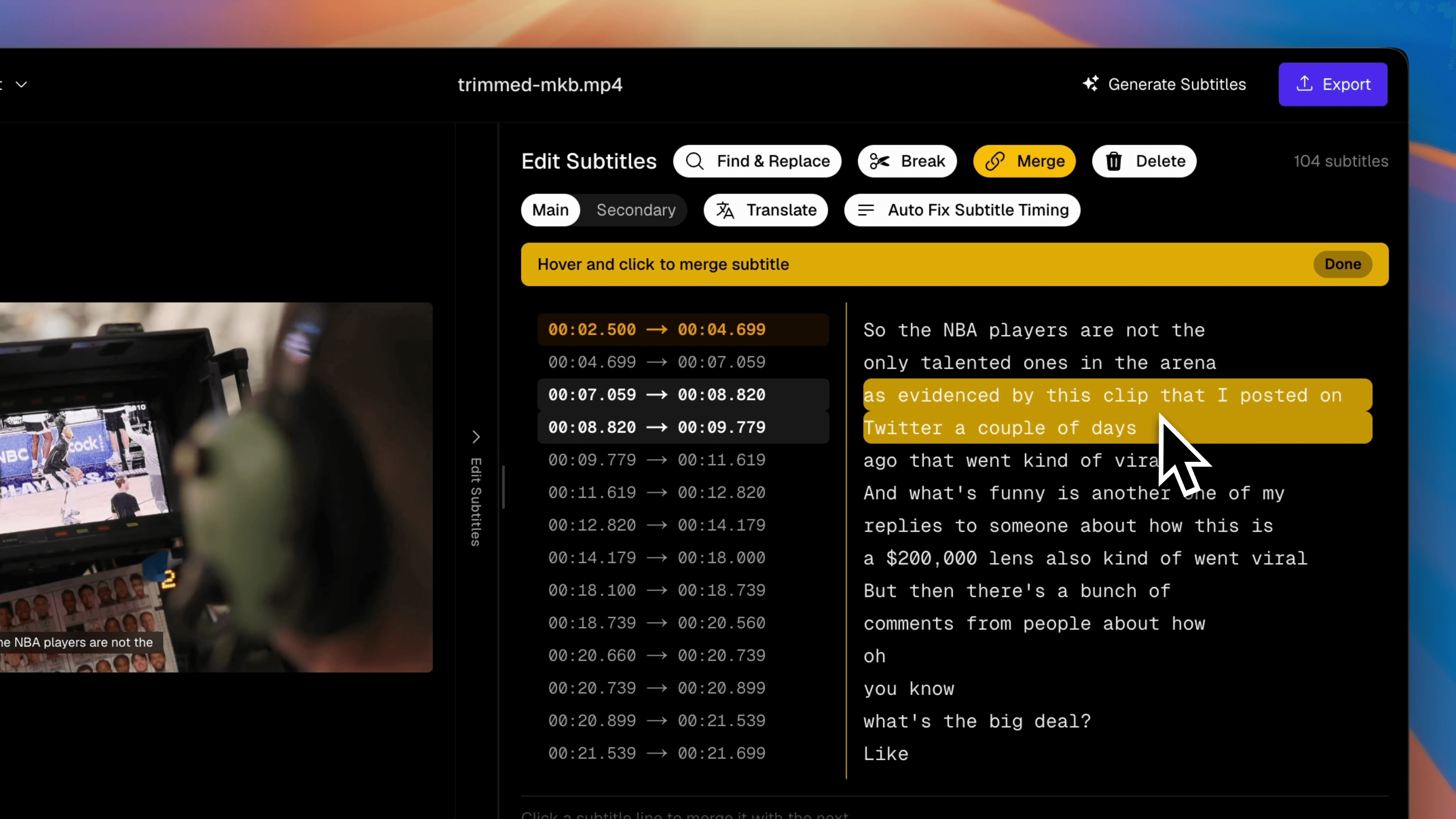 Subtitle Studio merge tool joining two short subtitle blocks into one caption
Translate — generate a second-language subtitle track from your corrected source, preserving every timecode. Connect OpenAI, DeepSeek, Grok, or a local Ollama model.
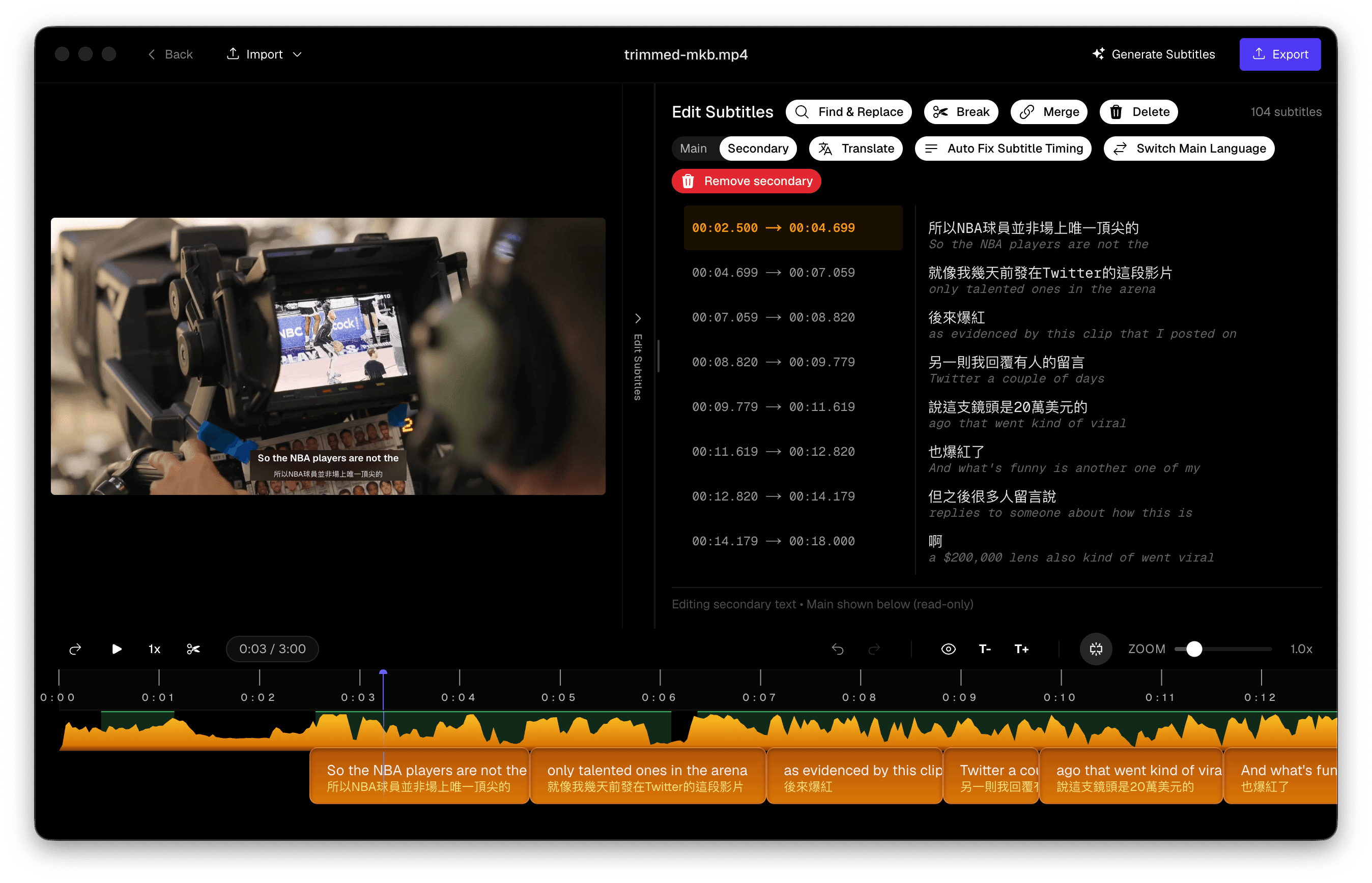 Subtitle Studio translate panel with language selector and AI provider options
These aren't afterthoughts — they're the daily workflow of anyone who ships captioned video or podcast clips regularly.
Side-by-Side Comparison
We processed the same test clips in both apps. The table below summarises the differences that showed up consistently across English dialogue, multilingual content, and Chinese speech.
| MacWhisper | Subtitle Studio | |
|---|---|---|
| Accuracy (clean speech) | Good | Good |
| Accuracy (music / noise) | Words frequently missing; music sections unreliable | VAD + noise reduction pre-processing improves word capture |
| Hallucination handling | Raw Whisper output; phantom text possible | Hallucination fix removes invented segments |
| Timing precision | Approximate Whisper timestamps (~1s granularity) | Forced aligner; word-level sync to waveform |
| Segmentation | Automatic blocks; limited control | NLP post-processing + split, merge, and line-break tools |
| Subtitle editing | Transcript view; export SRT for external editing | Full waveform editor with drag-to-realign |
| Multilingual optimisation | Whisper defaults | Tuned pipeline for mixed-language video |
| Chinese optimisation | Standard Whisper Chinese | Enhanced segmentation and punctuation for CJK |
| Translation | Not built in | Built-in, timecode-preserving, multiple AI providers |
| Best for | Meetings, interviews → plain text | Video, podcasts, clips → SRT / FCPXML for publishing |
Accuracy: On studio-quality narration with no background music, both apps perform similarly — Whisper large-v3 is Whisper large-v3. The difference appears the moment you add a soundtrack, room echo, or compressed social-media audio. Subtitle Studio's VAD and noise-reduction preprocessing recovers words MacWhisper misses.
Segmentation: Whisper tends to produce long blocks or choppy fragments depending on pauses. Subtitle Studio's NLP post-processing breaks the transcript at natural phrase boundaries for maximum readability — then split, merge, and line-break tools let you fine-tune blocks to match your style guide (42 characters per line for horizontal video, 20 for vertical) without re-exporting from another app.
Multilingual optimisation: Both support 90+ languages, but subtitle timing and line breaking behave differently across scripts. Subtitle Studio's pipeline is tuned for video captioning across languages — not just producing a text dump.
Chinese optimisation: Mandarin and Cantonese present unique challenges: no word spaces, tone-sensitive homophones, and punctuation rules that differ from English. Subtitle Studio's NLP post-processing applies CJK-specific segmentation and punctuation restoration that raw Whisper output lacks, producing subtitle lines that read naturally on screen rather than as one continuous string.
Watch the Comparison
The video below shows the same clip processed by both apps. Watch for missing words during the music section, timing drift on fast dialogue, and the difference in line segmentation.
Verdict: Different Tools for Different Jobs
MacWhisper is a strong transcription tool. If you record meetings on Zoom or need searchable plain-text transcripts from interviews — it does that job well, privately, with a fair one-time price. Speaker diarisation, batch processing, and watch-folder automation are genuinely useful for audio-first workflows where the deliverable is text, not subtitles.
Subtitle Studio is built for subtitle production. If your deliverable is an SRT file for a YouTube video, a full podcast episode upload, audiogram clips for Instagram or TikTok, a translated track for an international audience, or an FCPXML import for styled captions in Final Cut Pro — you need accurate timing, clean segmentation, and editing tools in the same app. That's what Subtitle Studio optimises for — whether the source is a vlog, a tutorial, or a two-hour podcast episode.
Using MacWhisper for subtitles is like using a word processor to edit a timeline: it can export the right file format, but the workflow wasn't designed for the job.
Subtitle Studio
One-time purchase. Runs fully offline on your Mac.
Frequently Asked Questions
Can MacWhisper make subtitles?
Yes. MacWhisper Pro exports SRT and VTT files with timestamps. For simple clips with clean audio and minimal editing needs, that may be enough. For anything with background music, fast cuts, or non-English content, expect significant manual cleanup — either in the exported file or in a separate editor.
Do both apps use the same AI model?
Both are built on OpenAI's Whisper family, but they are not identical under the hood. Subtitle Studio uses an optimised, fine-tuned Whisper model trained and tuned specifically for video and podcast content — delivering faster transcription and higher accuracy on the kind of mixed audio creators actually work with: dialogue over intro music, room noise, compressed social-media audio, and multilingual speech.
MacWhisper gives you access to standard Whisper model sizes (Tiny through Large) for general-purpose transcription. Subtitle Studio's model is paired with a full subtitle pipeline on top: VAD and noise-reduction preprocessing before transcription, NLP-based segmentation after it, hallucination filtering, forced alignment, and a subtitle-first editing interface.
Can Subtitle Studio handle podcasts?
Yes. Import your podcast video file — a full YouTube episode, a recorded interview, or a clip you're cutting for social — and Subtitle Studio generates timed, readable subtitles with the same pipeline used for any other video. It's especially useful for podcasters who publish video versions of their show, create audiograms, or need translated caption tracks for an international audience. If you only need a plain-text transcript for show notes with no subtitles, MacWhisper may be the simpler choice.
Is MacWhisper bad?
No. It's one of the best local transcription tools on Mac for turning audio into text. The comparison here is about fit for purpose — transcription versus subtitle production — not overall quality.
Which should I choose?
- Choose MacWhisper if you primarily need plain-text transcripts from meetings, calls, or interviews — including podcast show notes with no subtitles
- Choose Subtitle Studio if you edit video, publish podcast episodes on YouTube, cut captioned clips for social, or need accurate, editable, export-ready subtitles
Many podcasters use both: MacWhisper for the written show notes, Subtitle Studio for the YouTube upload and audiogram clips.
Try Subtitle Studio for free
One-time purchase. No subscription. Runs fully offline on your Mac.
