ඔබ Mac එකක video edit කරනවා නම්, MacWhisper ගැන අහලා ඇති. OpenAI හි Whisper model එක සම්පූර්ණයෙන්ම ඔබේ device එකේ run කරන popular app එකකි. Subtitle Studio එකම දේ engine level එකේ කරයි: දෙකම Whisper භාවිතා කරයි, දෙකෙන්ම speech transcribe කළ හැක, දේශීයව process කිරීමෙන් දෙකෙන්ම ඔබේ audio එක private ලෙස තබා ගනී.
එහෙනම් ඔබ එකක් තෝරන්නේ ඇයි?
Transcription සහ උපසිරැසි සම්බන්ධ වුවත් එකම වැඩක් නොවන නිසා. MacWhisper සැලසුම් කර ඇත්තේ audio එකක් text බවට හැරවීමට. Subtitle Studio සැලසුම් කර ඇත්තේ video සහ podcast episodes publish කිරීමට සූදානම් caption files බවට හැරවීමට — Whisper සඳහා audio preprocess කිරීම, කියවීමට පහසු segmentation සඳහා NLP සමඟ transcript post-process කිරීම, සහ creators ඇත්තටම වැඩ කරන ආකාරයට match වන editing tools ලබා දීම.
අපි එකම clips දෙක app වලින්ම test කළා. සොයාගත් දේ මෙන්න.
MacWhisper සහ Subtitle Studio අතර පොදු වූ දේ
Tool දෙකම solid foundation එකක් share කරයි:
- Whisper එකයි underneath — OpenAI හි open-weight speech recognition model එක, Apple Silicon හෝ Intel Macs මත දේශීයව run වේ
- On-device පුද්ගලිකත්වය — ඔබේ video සහ audio ඔබේ machine එකෙන් කිසි විටෙකත් පිටවෙන්නේ නැත
- බහුභාෂා support — Whisper භාෂා 90+ක් box එකෙන් ම handle කරයි
- Export options — MacWhisper Pro SRT සහ VTT උපසිරැසි files export කළ හැක; Subtitle Studio SRT සහ FCPXML export කරයි
Zoom recording එකක් හෝ plain text ලෙස අවශ්ය meeting එකක් සඳහා, MacWhisper එක ශක්තිමත් තේරීමකි. audio file එකක් දාන්න, model size එකක් තෝරන්න, timestamps සමඟ transcript එකක් ලබා ගන්න.
Podcasts සඳහා, තේරීම ඔබේ deliverable එක මත depend වේ. show notes හෝ search සඳහා text transcript එකක් අවශ්ය නම් MacWhisper හොඳයි. පූර්ණ episode එක YouTube හි publish කරන, social සඳහා audiogram clips cut කරන, හෝ ඔබේ show හි ඕනෑම video version එකක් සඳහා accurate, editable SRT captions අවශ්ය නම් Subtitle Studio එක වඩා සුදුසුයි.
ඔබේ ඉලක්කය උපසිරැසි වන විට — video, podcast video, හෝ clips සඳහා — විශේෂයෙන් background music, fast speech, බහුභාෂා, හෝ Chinese dialogue සහිත content සඳහා, gap එක පෙනී යයි.
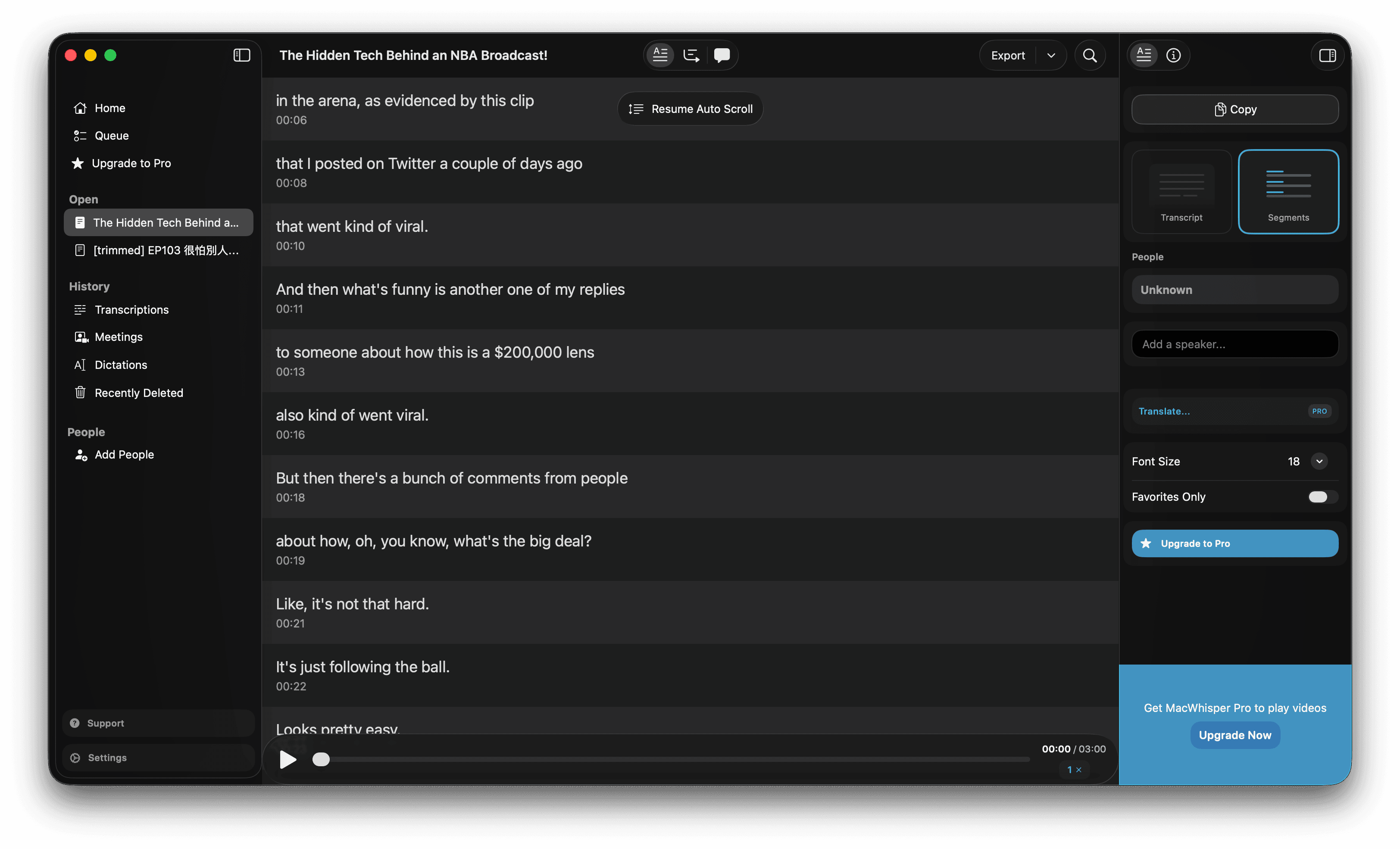 video file එකක් process කිරීමෙන් පසු transcript view එකක් පෙන්වන MacWhisper interface එක
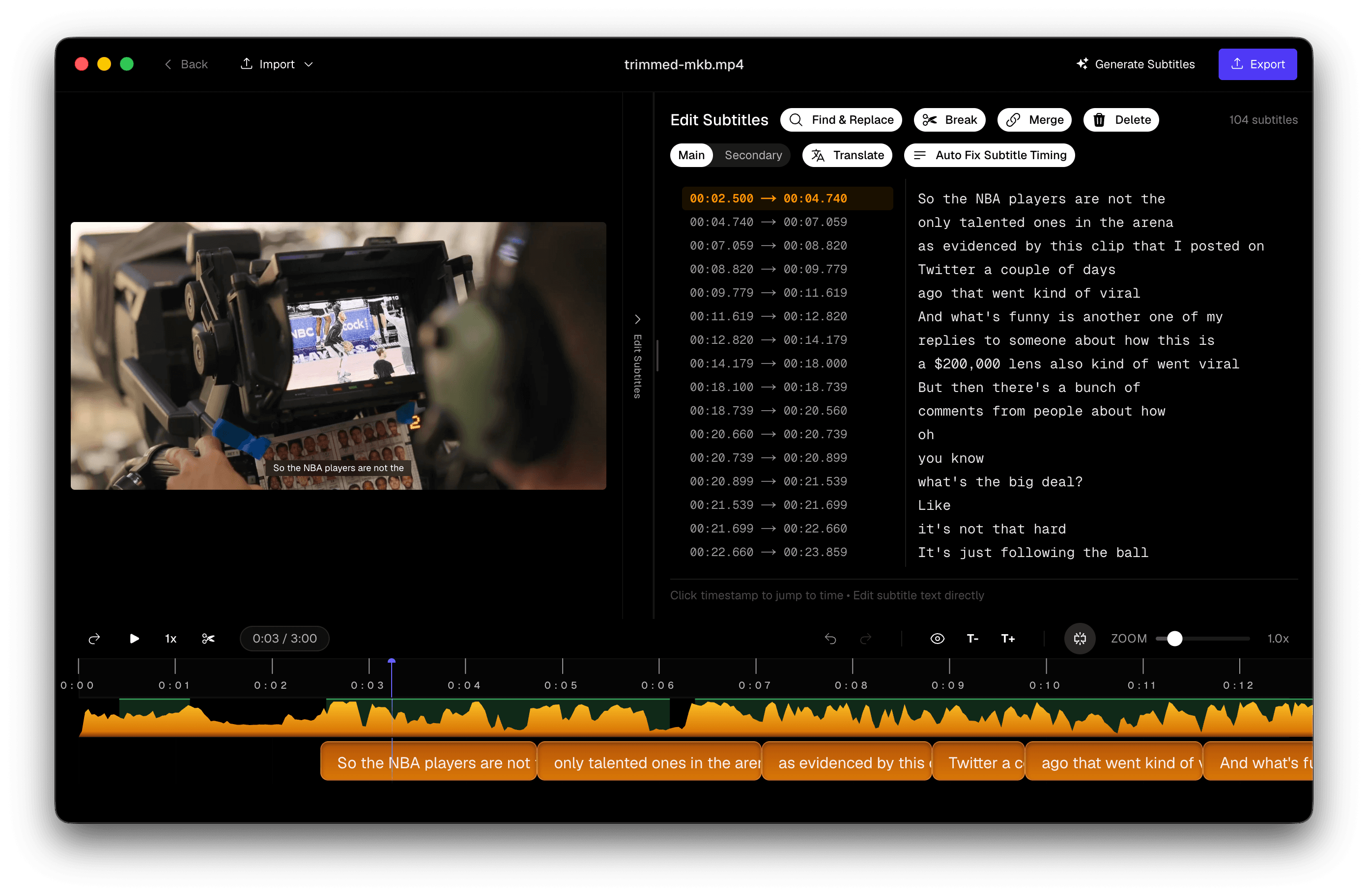 speech එකට align කළ waveform, උපසිරැසි ලැයිස්තුව, සහ video preview සමඟ Subtitle Studio editor
Video උපසිරැසි සඳහා MacWhisper අඩුපාඩු ඇති තැන්
MacWhisper design කර ඇත්තේ transcription assistant එකක් ලෙසයි, උපසිරැසි editor එකක් ලෙස නොවේ. Video creators ට වඩාත්ම වැදගත් තැන් තුනකදී එය පෙනී යයි.
Background Music සහ නැති වන Words
Whisper — සහ එතුළින්ම MacWhisper — background music, intro jingles, හෝ ambient sound සමඟ speech තරඟ කරන විට අපහසුතාවයට පත් වේ. Confidence අඩු වූ විටත් model එක සෑම audio segment එකකටම text produce කිරීමට trained කර ඇත. ප්රායෝගිකව, එයින් බොහෝ විට අදහස් වන්නේ:
- music එකෙන් consonants mask වූ විට හෝ speech volume අඩු වූ විට වචන drop වීම
- sentence දෙකක් block එකකට blur වන phrases merge වීම
- transcript එකේ කිසි විටෙකත් නොපෙනෙන dialogue හි gaps
මෙය Whisper හි දන්නා limitation එකකි, MacWhisper වලට විශේෂිත නොවේ. MacWhisper ඔබේ audio එක Whisper වලට එසේම direct ලෙස යවයි. signal එක clean කිරීමට හෝ speech recognition සඳහා optimise කිරීමට preprocessing step එකක් නැත.
සැබෑ උපසිරැසි Editing Workflow එකක් නැත
MacWhisper ඔබට playback එකත් සමඟ transcript එකක් කියවීමට සහ SRT export කිරීමට ඉඩ දෙයි. එය ලබා නොදෙන්නේ උපසිරැසි-first editor එකකි:
- caption එකක් exact syllable එකට nudge කිරීමට waveform-synced timing handles නැත
- awkward line breaks fix කිරීමට split හෝ merge tools නැත
- block එකක start time එක තප්පරයෙන් අඩක් වැරදි වූ විට drag-to-realign workflow එකක් නැත
- ඔබේ timecodes සමඟ bind වූ built-in පරිවර්තනයක් නැත
Caption එකක් තප්පර දෙකකින් ඉක්මන් නම් හෝ vertical video සඳහා line එකක් ඉතා දිග නම්, MacWhisper හි ඔබේ options වන්නේ export කළ SRT එක text editor එකකින් edit කිරීම හෝ වෙනත් app එකක් open කිරීමයි. විනාඩි පහක clip එකකට එය manageable ය. විනාඩි 40ක interview එකකට හෝ social cuts batch එකකට එය bottleneck එක බවට පත් වේ.
Hallucinations වීමේ අවදානම වැඩිය
Whisper hallucination — silence, music, හෝ noise තිබෙන විට model එක plausible-looking text generate කිරීම — model එකේ වඩාත්ම documented issues එකකි. Symptoms අතරට:
- music bed එකක් අතරතුර එකම phrase එක දුසිම් ගණනක් repeat වීම
- quiet sections අතරතුර "Thanks for watching!" හෝ ඒ හා සමාන filler එකක් insert වීම
- කිසි විටෙකත් කථා නොකළ dialogue invent කිරීම
MacWhisper Whisper produce කරන දේ output කරයි. Subtitle Studio හි confidence scoring සහ speech-activity analysis භාවිතයෙන් මෙම phantom segments detect කර remove කරන hallucination fix optimisation එකක් ඇත — එමගින් ඔබේ උපසිරැසි track එක model එක jingle එකක් අතරතුර guess කළ දේ නොව, ඇත්තටම කථා කළ දේ reflect කරයි.
Whisper එකට උඩින් Subtitle Studio එකතු කරන දේ
Subtitle Studio Whisper replace කරන්නේ නැත — එය video සහ podcast content captioning සඳහාම designed කළ stage-තුනක pipeline එකක් තුළ එය wrap කරයි: preprocess → transcribe → post-process.
Pre-Processing: Whisper Run වීමට පෙර Optimised Audio
Whisper ඔබේ file එක බැලීමට පෙර, model එකට හැකි පිරිසිදුම input එක ලැබෙන ලෙස Subtitle Studio audio එක සූදානම් කරයි:
- Voice activity detection (VAD) — track එකේ ඉ speech ඇති කොහෙද, silence, music, හෝ ambient noise ඇති කොහෙද යනාදිය හඳුනාගනී
- Noise reduction — background hum, room echo, සහ competing sound suppress කර consonants සහ word boundaries පැහැදිලිව තබයි
- Speech isolation — full mixed audio bed එකට වඩා වැදගත් dialogue එක මත Whisper focus කරයි
මෙය production Whisper setups වල recommend කරන එකම class එකේ preprocessing එකකි — නමුත් built-in, automatic, සහ ඔබම configure කරන එකක් වෙනුවට video සහ podcast audio සඳහාම tune කර ඇත. පිරිසිදු input එකින් අදහස් වන්නේ intro music අතරතුර drop වන වචන අඩුවීම, noisy clips වල garbled output අඩුවීම, සහ non-speech sections අතරතුර model එක text invent කිරීමේ අවදානම අඩුවීමයි.
Post-Processing: Readability සඳහා NLP Segmentation
Raw Whisper output එක transcript එකකි, උපසිරැසි නොවේ. දිග run-on blocks, awkward mid-phrase breaks, සහ නැති punctuation text document එකකට හොඳයි — නමුත් screen එකේ කියවීමට අපහසුයි.
Transcription එකෙන් පසුව, Subtitle Studio එය properly segmented captions බවට හැරවීමට NLP-based post-processing ඔස්සේ run කරයි:
- ස්වභාවික phrase boundaries — lines break වන්නේ arbitrary character counts වලින් නොව clauses සහ sentence edges වලින්
- Readability rules — viewers hurry නොවී follow කළ හැකි ලෙස block length සහ reading speed tune කර ඇත
- Punctuation restoration — Whisper missed කළ commas, periods, සහ question marks restore කරයි
- Language-aware splitting — Chinese, Japanese වැනි CJK භාෂාවලට, English line breaks ක්රියා කරන ආකාරයට නොව, එම scripts screen එකේ කියවෙන ආකාරයට respect කරන segmentation ලබා දේ
Goal එක වන්නේ minimal manual cleanup එකකින් ship කළ හැකි උපසිරැසි — ඔබ තවමත් අතින් reformat කළ යුතු text wall එකක් නොවේ.
Frame-Accurate Timing සඳහා Forced Alignment
Whisper හි built-in timestamps approximate ය. ඒවා බොහෝ විට closest second එකට round කර ඇත, එය transcript එකකට හොඳ නමුත් වචනයක් කථා කරන ක්ෂණයේ exact ලෙස පෙනිය යුතු උපසිරැසි සඳහා නොවේ.
Subtitle Studio transcription එකෙන් පසු forced aligner එකක් run කරයි: text එක audio waveform එකට word level එකේ map කරයි, එමගින් සෑම උපසිරැසි block එකක්ම speech ඇත්තටම ආරම්භ වූ සහ නැවතුණු තැනින් start සහ end වේ. ප්රතිඵලය video එකට sync වූ බවක් දැනෙන captions — beat එකකින් කලින් float වන හෝ speaker නැවතුණාට පසු lingering වන ඒවා නොවේ.
Built-In Editing Tools
Captions polish කිරීමට අවශ්ය සියල්ල window එකකම ඇත:
Realign — උපසිරැසියේ edge එකක් අල්ලා waveform එකට එරෙහිව drag කරන්න. Timecodes type නොකර timing real-time updated වේ.
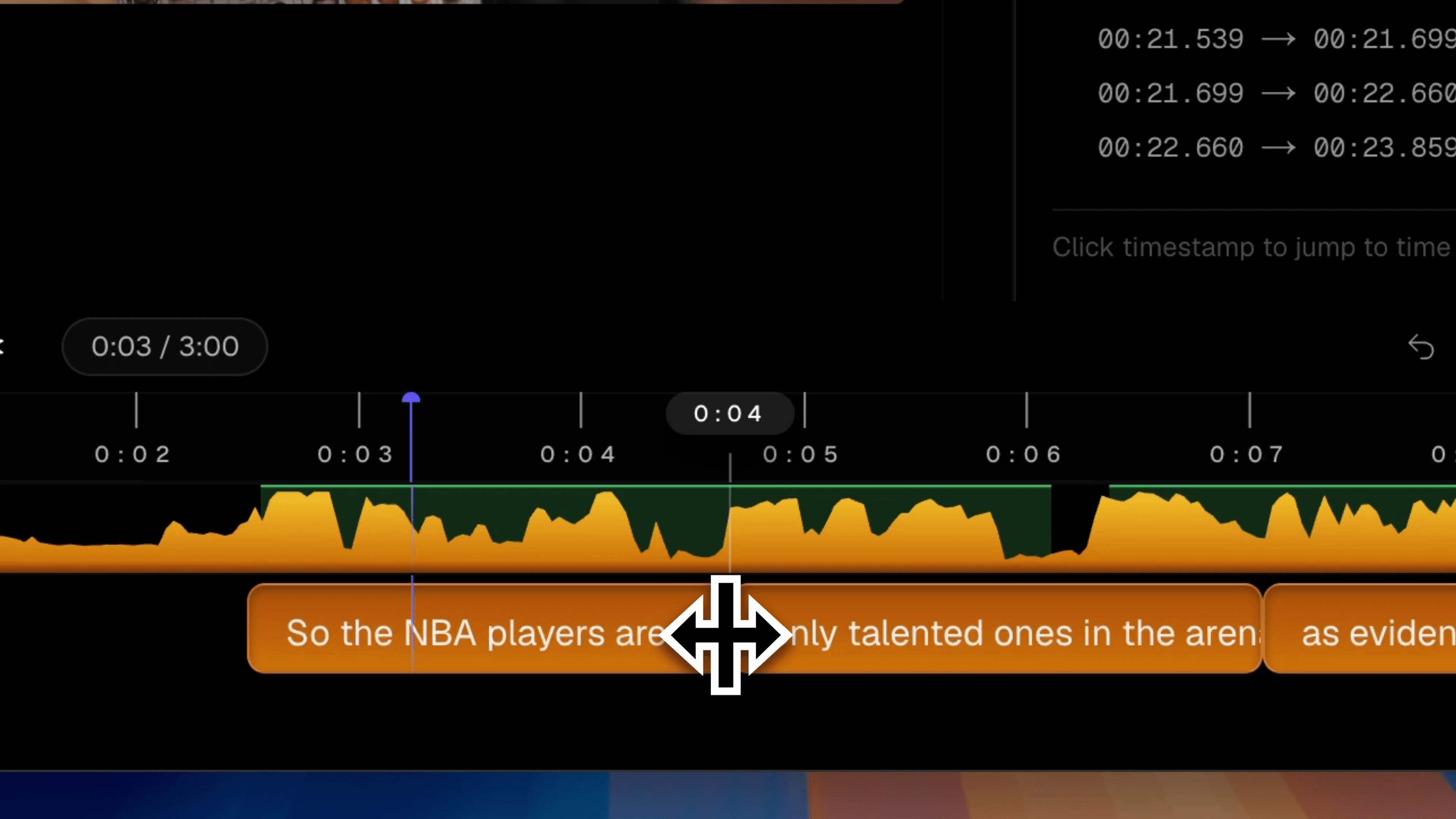 audio waveform එකට match වීමට drag කරන උපසිරැසි block එකක් සමඟ Subtitle Studio realign tool
Split — playhead එකේ overlong caption එකක් කියවීමට පහසු lines දෙකකට break කරන්න. Timing ස්වයංක්රීයව redistribute වේ.
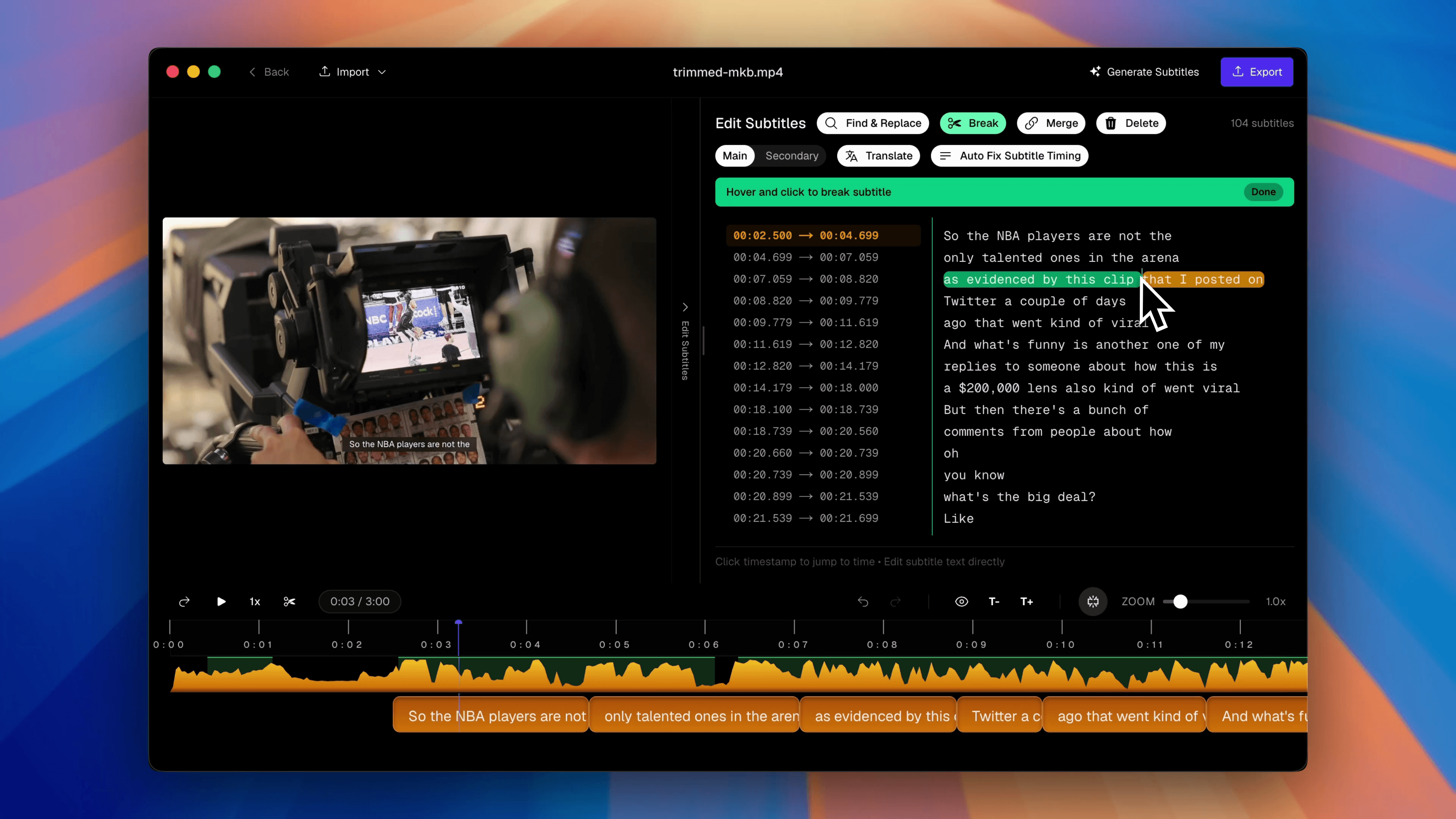 දිග උපසිරැසි line එකක් කෙටි blocks දෙකකට බෙදන Subtitle Studio split tool
Merge — fragmented Whisper output smooth, continuous lines බවට combine කරන්න.
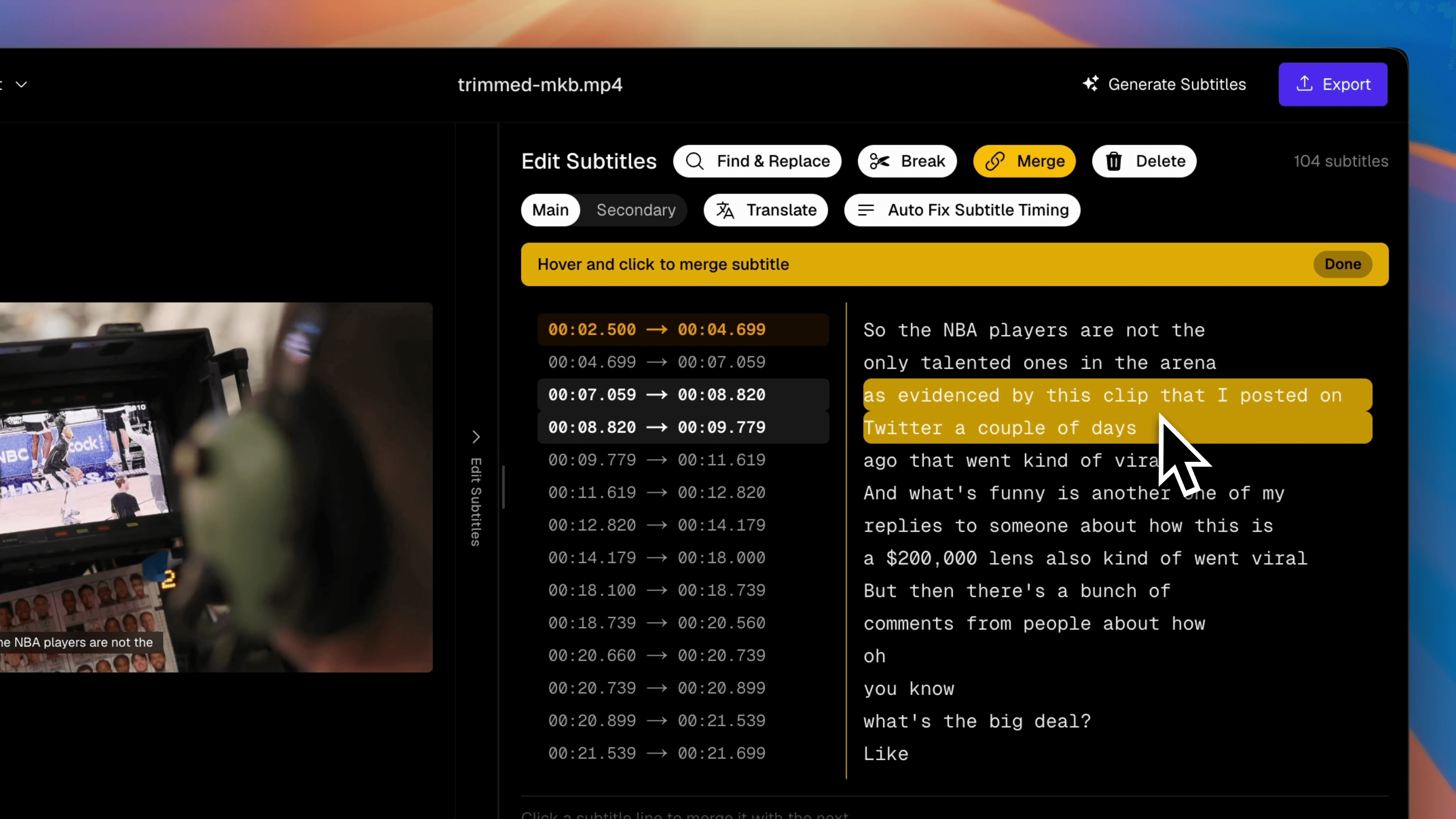 කෙටි උපසිරැසි blocks දෙකක් caption එකකට join කරන Subtitle Studio merge tool
Translate — ඔබේ correct කළ source එකෙන් second-language උපසිරැසි track එකක් generate කරන්න, සෑම timecode එකක්ම preserve කරමින්. OpenAI, DeepSeek, Grok, හෝ දේශීය Ollama model එකකට connect කරන්න.
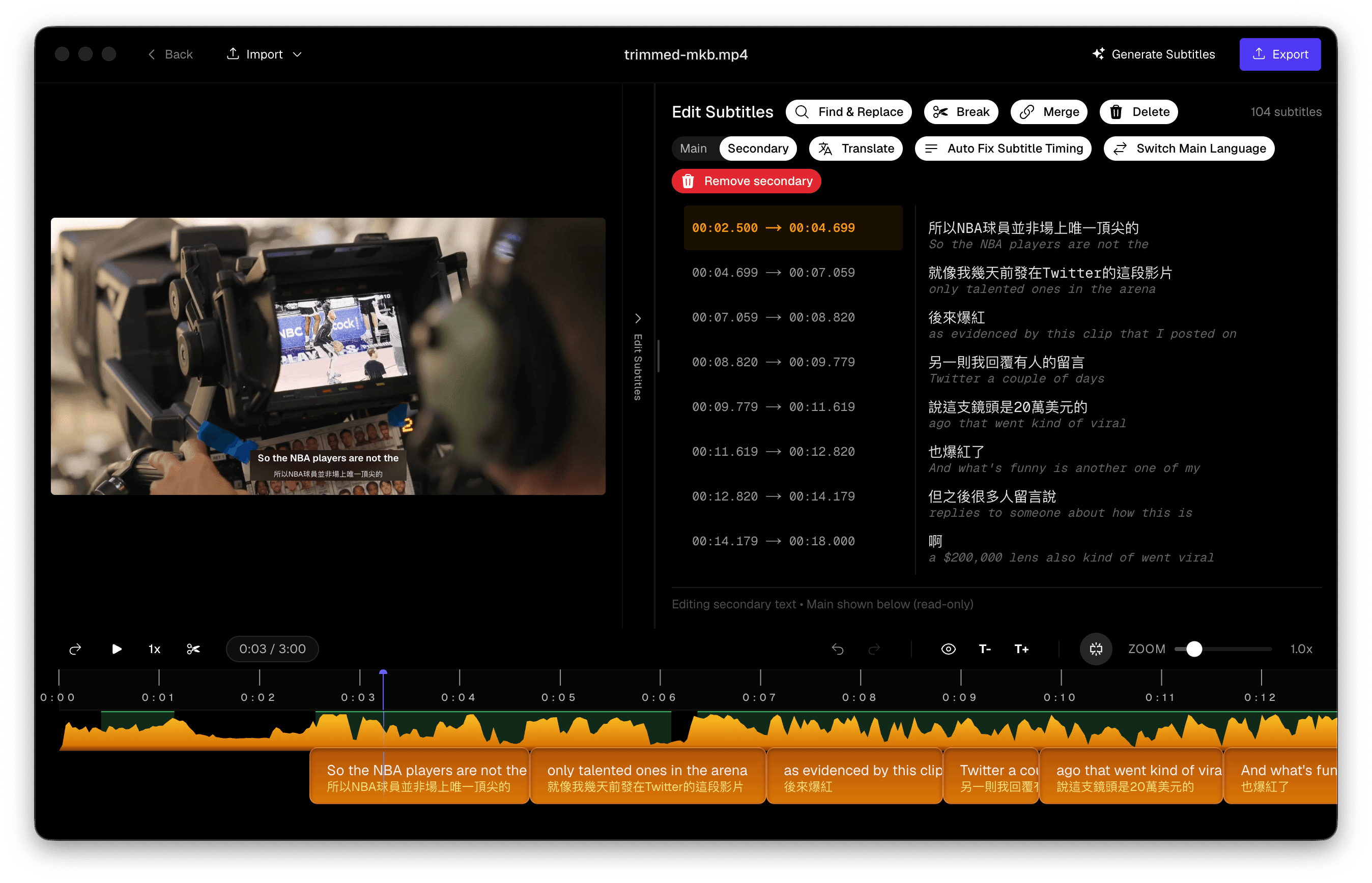 language selector සහ AI provider options සමඟ Subtitle Studio translate panel
මේවා afterthoughts නොවේ — captioned video හෝ podcast clips නිතිපතා ship කරන කෙනෙකුගේ දිනපතා workflow එකයි.
Side-by-Side සැසඳීම
අපි app දෙකෙන්ම එකම test clips process කළා. පහත table එකෙන් English dialogue, බහුභාෂා content, සහ Chinese speech හරහා consistently පෙනී ගිය වෙනස්කම් summarise කරයි.
| MacWhisper | Subtitle Studio | |
|---|---|---|
| Accuracy (clean speech) | Good | Good |
| Accuracy (music / noise) | වචන නිතර නැති වේ; music sections unreliable | VAD + noise reduction preprocessing මගින් word capture වැඩි දියුණු කරයි |
| Hallucination handling | Raw Whisper output; phantom text possible | Hallucination fix invented segments remove කරයි |
| Timing precision | Approximate Whisper timestamps (~1s granularity) | Forced aligner; waveform එකට word-level sync |
| Segmentation | Automatic blocks; limited control | NLP post-processing + split, merge, සහ line-break tools |
| Subtitle editing | Transcript view; external editing සඳහා SRT export | drag-to-realign සමඟ full waveform editor |
| Multilingual optimisation | Whisper defaults | mixed-language video සඳහා tuned pipeline |
| Chinese optimisation | Standard Whisper Chinese | CJK සඳහා enhanced segmentation සහ punctuation |
| Translation | Built-in නැත | Built-in, timecode-preserving, AI providers ගණනාවක් |
| වඩාත් සුදුසු | Meetings, interviews → plain text | Video, podcasts, clips → publishing සඳහා SRT / FCPXML |
Accuracy: background music නොමැති studio-quality narration එකක, app දෙකම සමානව ක්රියා කරයි — Whisper large-v3 එක Whisper large-v3 ම ය. soundtrack එකක්, room echo එකක්, හෝ compressed social-media audio එකක් එකතු කරන ක්ෂණයේම වෙනස පෙනී යයි. Subtitle Studio හි VAD සහ noise-reduction preprocessing එකෙන් MacWhisper miss කරන වචන recover වේ.
Segmentation: Whisper pauses මත depend වී දිග blocks හෝ choppy fragments produce කිරීමට tendency ඇත. Subtitle Studio හි NLP post-processing එකෙන් maximum readability සඳහා ස්වභාවික phrase boundaries වලදී transcript break කරයි — එවිට split, merge, සහ line-break tools මගින් වෙනත් app එකකින් re-export නොකර ඔබේ style guide (horizontal video සඳහා line එකකට character 42, vertical සඳහා 20) match වන ලෙස blocks fine-tune කළ හැක.
Multilingual optimisation: දෙකම භාෂා 90+ support කරයි, නමුත් scripts හරහා උපසිරැසි timing සහ line breaking වෙනස් ලෙස ක්රියා කරයි. Subtitle Studio හි pipeline එක text dump එකක් පමණක් produce කිරීම නොව, භාෂා හරහා video captioning සඳහාම tune කර ඇත.
Chinese optimisation: Mandarin සහ Cantonese unique challenges ඉදිරිපත් කරයි: word spaces නැත, tone-sensitive homophones, සහ English වලට වඩා වෙනස් punctuation rules. Raw Whisper output වල නොමැති CJK-specific segmentation සහ punctuation restoration Subtitle Studio හි NLP post-processing එකෙන් apply කරයි, එමගින් එක continuous string එකක් වීම වෙනුවට screen එකේ ස්වභාවිකව කියවෙන උපසිරැසි lines produce කරයි.
සැසඳීම බලන්න
පහත video එකෙන් එකම clip එක app දෙකෙන්ම process කළ ආකාරය පෙන්වයි. music section එකේ නැති වන වචන, fast dialogue එකේ timing drift, සහ line segmentation හි වෙනස ගැන අවධානය යොමු කරන්න.
තීන්දුව: වේනස් වැඩ සඳහා වෙනස් Tools
MacWhisper ශක්තිමත් transcription tool එකකි. ඔබ Zoom හි meetings record කරනවා නම් හෝ interviews වලින් searchable plain-text transcripts අවශ්ය නම් — එය එම වැඩය දක්ෂ ලෙස, private ලෙස, සාධාරණ එක් වර මිලකට කරයි. Speaker diarisation, batch processing, සහ watch-folder automation deliverable එක text වන, උපසිරැසි නොවන audio-first workflows සඳහා ඇත්තටම ප්රයෝජනවත්ය.
Subtitle Studio උපසිරැසි production සඳහාම නිර්මාණය කර ඇත. ඔබේ deliverable එක YouTube video එකක් සඳහා SRT file එකක්, පූර්ණ podcast episode upload එකක්, Instagram හෝ TikTok සඳහා audiogram clips, international audience එකක් සඳහා පරිවර්තිත track එකක්, හෝ Final Cut Pro හි styled captions සඳහා FCPXML import එකක් නම් — ඔබට එකම app එකේම accurate timing, clean segmentation, සහ editing tools අවශ්යයි. vlog එකක්, tutorial එකක්, හෝ පැය දෙකක podcast episode එකක් වුවත් Subtitle Studio optimise කරන්නේ ඒ සඳහාමයි.
උපසිරැසි සඳහා MacWhisper භාවිතා කිරීම timeline එකක් edit කිරීමට word processor එකක් භාවිතා කිරීම වගේ ය: නිවැරදි file format එක export කළ හැකි වුවත්, workflow එක එම වැඩය සඳහා design කර නැත.
Subtitle Studio
එක් වර පමණක් ගෙවීම. ඔබේ Mac එකේ සම්පූර්ණයෙන්ම offline ක්රියාත්මක වේ.
නිතර අසන ප්රශ්න
MacWhisper වලින් උපසිරැසි හදන්න පුළුවන්ද?
ඔව්. MacWhisper Pro timestamps සමඟ SRT සහ VTT files export කරයි. clean audio සහ minimal editing අවශ්යතා ඇති simple clips සඳහා, එය ප්රමාණවත් විය හැක. background music, fast cuts, හෝ non-English content ඇති ඕනෑම දෙයකට, exported file එකේ හෝ වෙනම editor එකක significant manual cleanup එකක් අපේක්ෂා කරන්න.
App දෙකම එකම AI model එකද භාවිතා කරන්නේ?
දෙකම OpenAI හි Whisper family එක මත build කර ඇත, නමුත් underneath ඒවා identical නොවේ. Subtitle Studio video සහ podcast content සඳහාම trained සහ tuned කළ optimised, fine-tuned Whisper model එකක් භාවිතා කරයි — creators ඇත්තටම වැඩ කරන mixed audio types වල වේගවත් transcription සහ වැඩි accuracy ලබා දෙයි: intro music එකට උඩින් dialogue, room noise, compressed social-media audio, සහ බහුභාෂා speech.
MacWhisper general-purpose transcription සඳහා standard Whisper model sizes (Tiny සිට Large දක්වා) access ලබා දෙයි. Subtitle Studio හි model එක එහි උඩින්ම සම්පූර්ණ උපසිරැසි pipeline එකක් සමඟ pair කර ඇත: transcription එකට පෙර VAD සහ noise-reduction preprocessing, ඉන් පසු NLP-based segmentation, hallucination filtering, forced alignment, සහ subtitle-first editing interface එකක්.
Subtitle Studio හට podcasts handle කළ හැකිද?
ඔව්. ඔබේ podcast video file එක — පූර්ණ YouTube episode එකක්, record කළ interview එකක්, හෝ social සඳහා cut කරන clip එකක් — import කරන්න, එවිට Subtitle Studio වෙනත් video එකකට භාවිතා කරන එකම pipeline එකෙන් timed, readable උපසිරැසි generate කරයි. Video versions publish කරන, audiograms create කරන, හෝ international audience සඳහා පරිවර්තිත caption tracks අවශ්ය podcasters ට එය විශේෂයෙන් ප්රයෝජනවත්ය. show notes සඳහා plain-text transcript එකක් පමණක් අවශ්ය නම්, උපසිරැසි නොමැතිව, MacWhisper එක සරල තේරීම විය හැක.
MacWhisper එක නරකද?
නැත. audio එක text බවට හැරවීම සඳහා Mac හි ඇති හොඳම local transcription tools එකකි. මෙතන සැසඳීම fit for purpose ගැනයි — transcription vs subtitle production — සමස්ත quality ගැන නොවේ.
මම කුමක් තෝරන්නද?
- MacWhisper තෝරන්න ඔබට primarily meetings, calls, හෝ interviews වලින් plain-text transcripts අවශ්ය නම් — උපසිරැසි නොමැති podcast show notes ඇතුළුව
- Subtitle Studio තෝරන්න ඔබ video edit කරනවා නම්, podcast episodes YouTube හි publish කරනවා නම්, social සඳහා captioned clips cut කරනවා නම්, හෝ accurate, editable, export-ready උපසිරැසි අවශ්ය නම්
බොහෝ podcasters දෙකම භාවිතා කරයි: written show notes සඳහා MacWhisper, YouTube upload සහ audiogram clips සඳහා Subtitle Studio.
Subtitle Studio නොමිලේ උත්සාහ කරන්න
එක් වර ගෙවීමකි, දායකත්වයක් නැත. ඔබේ Mac එකේම සම්පූර්ණයෙන් ඕෆ්ලයින්ව ක්රියා කරයි.
